 DIMENSI
ResearchRabbit: Semak Sama Ada Rujukan daripada Chatbot AI Benar-benar Wujud
Anda minta chatbot AI (kecerdasan buatan) mencadangkan rujukan untuk laporan. Dalam beberapa saat, ia memberi lima rujukan jurnal lengkap dengan tajuk, pengarang dan tahun. Semuanya nampak meyakinkan. Tetapi adakah kertas itu benar-benar wujud?
Ramai orang terus menyalin rujukan itu ke dalam laporan tanpa menyemaknya. Ini berisiko kerana chatbot AI kadang-kadang mereka rujukan yang kelihatan betul tetapi sebenarnya tiada. Jika rujukan palsu masuk ke dalam laporan rasmi, kredibiliti anda yang terjejas.
ResearchRabbit ialah satu alat yang boleh membantu anda menyemak rujukan sebegini dan mencari kertas sebenar yang berkaitan. Dalam artikel ini, kami terangkan apa fungsinya, berapa harganya, cara bermula dan perkara yang anda perlu jaga.
Apa fungsinya
ResearchRabbit ialah alat penemuan literatur, iaitu alat untuk mencari kertas penyelidikan. Ia menganalisis bibliografi (senarai rujukan), sitasi (rujukan oleh kertas lain) dan pengarang bersama untuk mencadangkan artikel yang berkaitan.
Anda bermula dengan “Seed”, iaitu kertas permulaan. Anda boleh mencari Seed melalui Lookup search dengan tajuk atau topik, atau dengan DOI (nombor pengenalan digital artikel). Anda juga boleh mengimport rujukan daripada Zotero, Mendeley, EndNote atau Paperpile.
Menurut ResearchRabbit, pangkalan datanya mempunyai lebih 310 juta artikel penyelidikan dan dikemas kini setiap minggu. Sumber utamanya ialah Crossref, Semantic Scholar dan OpenAlex. Jadi, jika anda mencari tajuk atau DOI daripada jawapan chatbot dan kertas itu muncul, anda boleh membuka butirannya dan membandingkan pengarang serta tahun.
Ciri utama
- Carian Seed: Cari kertas permulaan dengan tajuk, topik atau DOI melalui Lookup search.
- Import rujukan: Bawa masuk senarai rujukan daripada Zotero, Mendeley, EndNote atau Paperpile.
- Butang Grow: Mengembangkan peta kertas berkaitan secara visual.
- Rabbit-hole: Menunjukkan kertas Similar (serupa), Cites (yang memetik), Refs (rujukan) atau kertas oleh pengarang yang sama.
- Collection: Simpan kertas terpilih dalam koleksi dan kongsi koleksi itu.
- Cadangan tanpa LLM: Algoritma cadangan teras tidak menggunakan model bahasa besar (LLM, jenis AI seperti ChatGPT). Ia menggunakan rangkaian sitasi, ko-sitasi (kertas yang sering dipetik bersama) dan pautan pengarang.
Harga
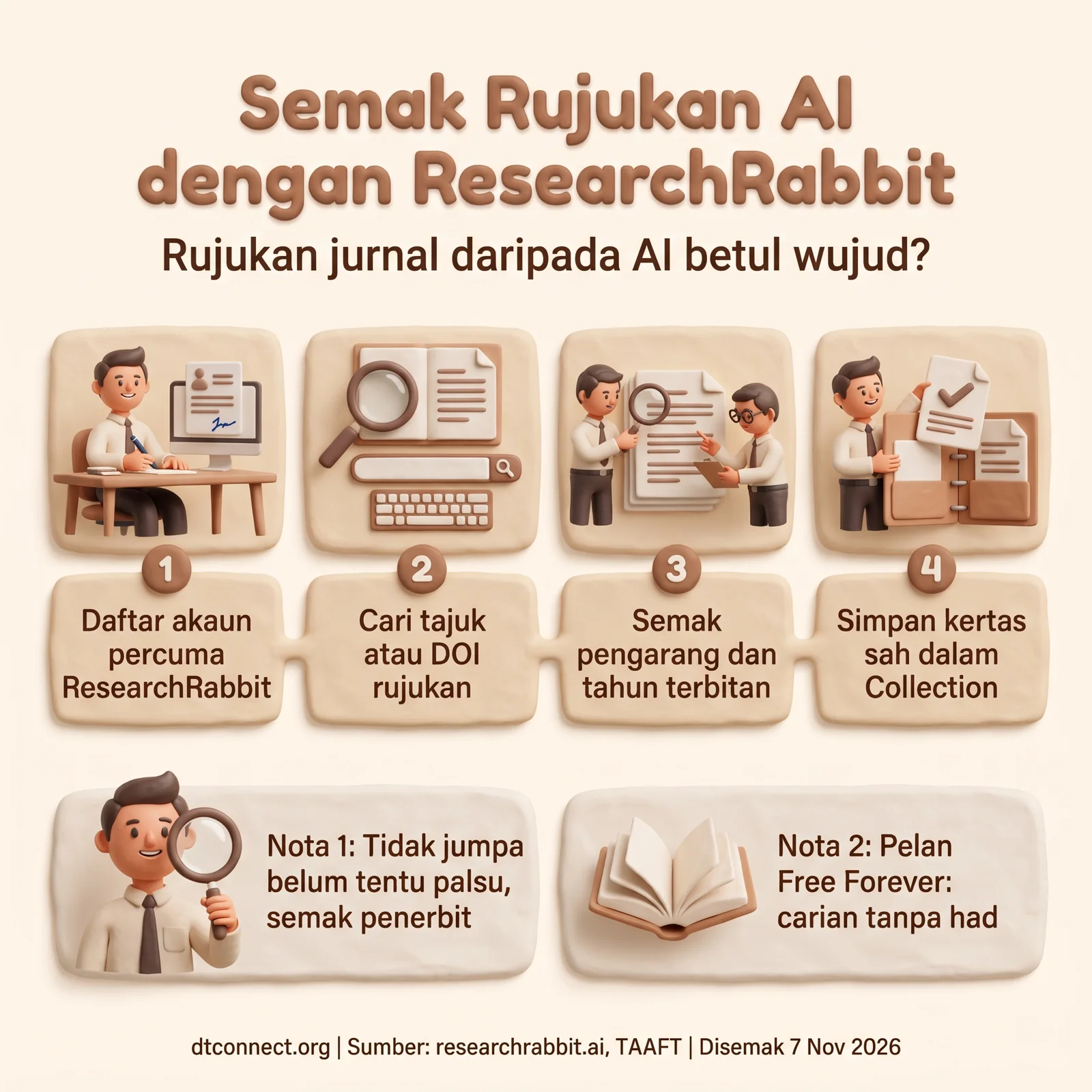
ResearchRabbit ada pelan Free Forever pada USD 0. Pelan ini memberi:
- Carian tanpa had.
- Perpustakaan dan koleksi tanpa had.
- Kongsi koleksi.
- Sehingga 50 artikel Seed.
Pelan berbayar dipanggil ResearchRabbit+ (RR+). Harganya USD 10 sebulan dengan bil tahunan, atau USD 12.50 sebulan dengan bil bulanan. RR+ menambah sehingga 300 artikel Seed, tetapan carian lanjutan dan berbilang projek. Sesetengah negara mendapat harga diskaun, tetapi laman rasmi tidak memperincikan harga untuk Malaysia.
Harga disemak pada 7 November 2026 dan mungkin berubah.
Cara bermula
- Daftar akaun percuma di researchrabbit.ai.
- Taip tajuk atau DOI rujukan daripada chatbot AI dalam Lookup search.
- Jika kertas itu dijumpai, buka butirannya dan semak nama pengarang serta tahun terbitan.
- Tekan Similar atau Refs untuk mencari kertas sebenar yang berkaitan dengan topik anda.
- Simpan kertas yang sah ke dalam Collection supaya mudah dirujuk semula.
Had dan perkara yang perlu diberi perhatian
Tidak jumpa belum tentu palsu. ResearchRabbit mengakui bahawa sesetengah artikel mungkin tiada. Ini boleh berlaku jika artikel itu tiada metadata Open Access (maklumat terbuka tentang kertas), tidak diindeks oleh Crossref, Semantic Scholar atau OpenAlex, atau terlalu baharu. Jika tidak jumpa, semak juga di laman penerbit sebelum membuat keputusan.
Kiraan sitasi. Bilangan sitasi dalam ResearchRabbit mungkin lebih rendah daripada Google Scholar. Jangan gunakan angka ini sebagai ukuran muktamad.
Saiz pangkalan data. Laman harga dan artikel bantuan menyebut “310+ million”, tetapi laman utama menyebut “over 320 million”. Kami menggunakan angka yang lebih rendah, iaitu lebih 310 juta.
Bahasa. Laman rasmi tidak menyebut sokongan Bahasa Melayu. Namun, carian berasaskan tajuk dan DOI, jadi antara muka Bahasa Inggeris tidak menghalang langkah asas.
Privasi data. ResearchRabbit menyatakan ia tidak menjual atau mendedahkan artikel atau nota anda kepada pihak ketiga. Ia juga menyatakan tidak melatih model AI dengan artikel atau nota anda. Ini dakwaan syarikat, bukan semakan kami.
Syarikat. Footer laman menyebut Litmap Limited. Laman rasmi tidak menerangkan hubungannya dengan Litmaps.
Sesuai untuk siapa
ResearchRabbit sesuai untuk pekerja pejabat, pegawai penyelidik, guru dan pelajar yang menggunakan chatbot AI untuk mencari rujukan. Ia berguna apabila anda perlu memastikan setiap rujukan dalam laporan, kertas kerja atau tesis benar-benar wujud.
Untuk semakan biasa, pelan Free Forever sudah memadai. Jika anda mengurus banyak projek penyelidikan serentak, anda boleh menimbang RR+.
Kesimpulan
Chatbot AI pantas memberi rujukan, tetapi tugas menyemak tetap milik anda. ResearchRabbit membantu anda mencari rujukan itu dalam pangkalan data besar dan menemui kertas sebenar yang berkaitan. Ingat, jika rujukan tidak dijumpai, semak di laman penerbit dahulu. Cuba semak satu rujukan hari ini.
Sumber
- ResearchRabbit, laman utama: researchrabbit.ai
- ResearchRabbit, How to get started with ResearchRabbit: learn.researchrabbit.ai
- ResearchRabbit, The ResearchRabbit database: learn.researchrabbit.ai
- ResearchRabbit, Pricing: researchrabbit.ai
- ResearchRabbit, ResearchRabbit free tier: learn.researchrabbit.ai
- ResearchRabbit, Data responsibility TL;DR: learn.researchrabbit.ai
- ResearchRabbit, How ResearchRabbit uses AI and where we don’t: learn.researchrabbit.ai
- There’s An AI For That, carian ResearchRabbit: theresanaiforthat.com
Artikel ini bebas dan tidak ditaja. Ciri dan harga disemak pada 7 November 2026 dan mungkin berubah.
Read this article in English
You ask an AI chatbot to suggest references for a report. Within seconds it gives you five journal references, complete with titles, authors and years. They all look convincing. But do those papers really exist?
Many people copy these references straight into their reports without checking. This is risky because AI chatbots sometimes invent references that look real but do not exist. If a fake reference ends up in an official report, it is your credibility that suffers.
ResearchRabbit is a tool that can help you check references like these and find real related papers. In this article we explain what it does, how much it costs, how to get started and what to watch out for.
What it does
ResearchRabbit is a literature discovery tool for finding research papers. It analyses bibliographies, citations and co-authors to suggest related articles.
You start with a “Seed”, a starting paper. You can find Seeds through Lookup search by title or topic, or by DOI (a digital identifier for an article). You can also import references from Zotero, Mendeley, EndNote or Paperpile.
According to ResearchRabbit, its database holds more than 310 million research articles and is updated weekly. Its main sources are Crossref, Semantic Scholar and OpenAlex. So if you search for a title or DOI from a chatbot answer and the paper appears, you can open its details and compare the authors and year.
Key features
- Seed search: Find starting papers by title, topic or DOI through Lookup search.
- Reference import: Bring in reference lists from Zotero, Mendeley, EndNote or Paperpile.
- Grow button: Expands a visual map of related papers.
- Rabbit-hole: Shows Similar papers, papers that Cite it, its Refs, or papers by the same authors.
- Collection: Save selected papers in a collection and share it.
- Recommendations without LLMs: The core recommendation algorithm does not use large language models (LLMs, the kind of AI behind ChatGPT). It uses citation networks, co-citation and author links.
Pricing
ResearchRabbit has a Free Forever plan at USD 0, with unlimited searches, unlimited library and collections, collection sharing and up to 50 Seed articles.
The paid plan is ResearchRabbit+ (RR+). It costs USD 10 a month billed annually, or USD 12.50 a month billed monthly. RR+ adds up to 300 Seed articles, advanced search settings and multiple projects. Some countries get discounted pricing, but the official site does not give details for Malaysia.
Prices were checked on 7 November 2026 and may change.
Getting started
- Sign up for a free account at researchrabbit.ai.
- Type the title or DOI of the reference from the AI chatbot into Lookup search.
- If the paper is found, open its details and check the authors and year of publication.
- Press Similar or Refs to find real papers related to your topic.
- Save verified papers to a Collection so you can refer to them again.
Limits and things to watch
Not found does not mean fake. ResearchRabbit acknowledges that some articles may be missing. This can happen if an article has no Open Access metadata, is not indexed by Crossref, Semantic Scholar or OpenAlex, or is very new. If you cannot find it, check the publisher’s website as well before deciding.
Citation counts. Citation counts in ResearchRabbit may be lower than in Google Scholar. Do not treat them as final.
Database size. The pricing page and help article say “310+ million”, but the home page says “over 320 million”. We use the lower figure of more than 310 million.
Language. The official site does not mention Malay support. However, searches are based on titles and DOIs, so the English interface does not block the basic steps.
Data privacy. ResearchRabbit states it does not sell or disclose your articles or notes to third parties, and does not train AI models on your articles or notes. These are the company’s claims, not our own checks.
Company. The site footer names Litmap Limited. The official site does not explain its relationship with Litmaps.
Who it is for
ResearchRabbit suits office workers, research officers, teachers and students who use AI chatbots to find references. It is useful when you need to make sure every reference in a report, working paper or thesis really exists. For everyday checks, the Free Forever plan is enough. If you manage many research projects at once, consider RR+.
Conclusion
AI chatbots give references quickly, but checking them is still your job. ResearchRabbit helps you look up those references in a large database and discover real related papers. Remember, if a reference is not found, check the publisher’s website first. Try checking one reference today.
Sources
- ResearchRabbit, home page: researchrabbit.ai
- ResearchRabbit, How to get started with ResearchRabbit: learn.researchrabbit.ai
- ResearchRabbit, The ResearchRabbit database: learn.researchrabbit.ai
- ResearchRabbit, Pricing: researchrabbit.ai
- ResearchRabbit, ResearchRabbit free tier: learn.researchrabbit.ai
- ResearchRabbit, Data responsibility TL;DR: learn.researchrabbit.ai
- ResearchRabbit, How ResearchRabbit uses AI and where we don’t: learn.researchrabbit.ai
- There’s An AI For That, ResearchRabbit search: theresanaiforthat.com
This article is independent and not sponsored. Features and prices were checked on 7 November 2026 and may change.