 DIMENSI
Semak Gambar dan Video AI Google dengan SynthID dalam Gemini
Sebuah gambar tular masuk ke kumpulan WhatsApp pejabat anda. Gambarnya nampak sangat meyakinkan. Rakan sekerja sudah mula berkongsi ke kumpulan lain. Anda pula tertanya-tanya, adakah gambar ini benar atau dibuat oleh AI (kecerdasan buatan)?
Hari ini, gambar, video dan audio yang dibuat oleh AI semakin sukar dibezakan daripada yang asli. Jika anda terus berkongsi, anda mungkin turut menyebarkan maklumat palsu tanpa sedar. Tetapi untuk menyemak, kebanyakan orang tidak tahu hendak bermula di mana.
Aplikasi Gemini kini ada satu alat yang boleh membantu. Artikel ini menerangkan fungsinya, kosnya, cara menggunakannya dan hadnya.
Apa fungsinya
Aplikasi Gemini ada alat pengesahan untuk menyemak sama ada gambar, video atau audio dibuat atau disunting dengan AI. Anda perlu log masuk dengan akaun Google untuk menggunakannya.
Alat ini menggunakan dua teknologi. Pertama, SynthID, iaitu tanda air halimunan (tanda tersembunyi yang tidak nampak oleh mata). Tanda ini diletakkan pada kandungan yang dibuat atau diubah oleh model AI Google. Kedua, Content Credentials berdasarkan piawaian C2PA (satu piawaian untuk merekod maklumat asal fail). Content Credentials menunjukkan asal usul dan sejarah suntingan sesuatu fail.
Ciri utama
- Semak tiga jenis fail: Gambar, video dan audio boleh disemak.
- Kesan SynthID: Mengenal pasti tanda air halimunan yang diletakkan oleh alat AI Google.
- Baca Content Credentials: Memaparkan maklumat asal usul dan sejarah suntingan fail berdasarkan piawaian C2PA.
- Muat naik dari pelbagai tempat: Pilih fail daripada peranti anda, Google Photos atau Google Drive.
- Tanya dengan ayat biasa: Contoh soalan rasmi ialah “Is this AI-generated?”, “Is this a real video?” dan “Was this image/video/audio created or edited by Google AI?”.
- Sokongan Bahasa Melayu: “Malay” disenaraikan sebagai bahasa yang disokong Gemini Apps, dan Malaysia ada dalam senarai negara.
Harga
Pelan Gemini “Free” ialah USD 0 sebulan dengan akaun Google. Google juga menawarkan pelan berbayar. Mengikut harga laman Amerika Syarikat, Google AI Plus berharga USD 4.99, Google AI Pro USD 19.99, dan Google AI Ultra bermula USD 99.99 sebulan.
Halaman bantuan Google tidak menyatakan sama ada ciri semakan ini berbeza mengikut pelan. Direktori There’s An AI For That (TAAFT) pula tidak memberi maklumat harga yang jelas untuk ciri ini, jadi kami ikut laman rasmi.
Harga disemak pada 6 November 2026 dan mungkin berubah.
Cara bermula
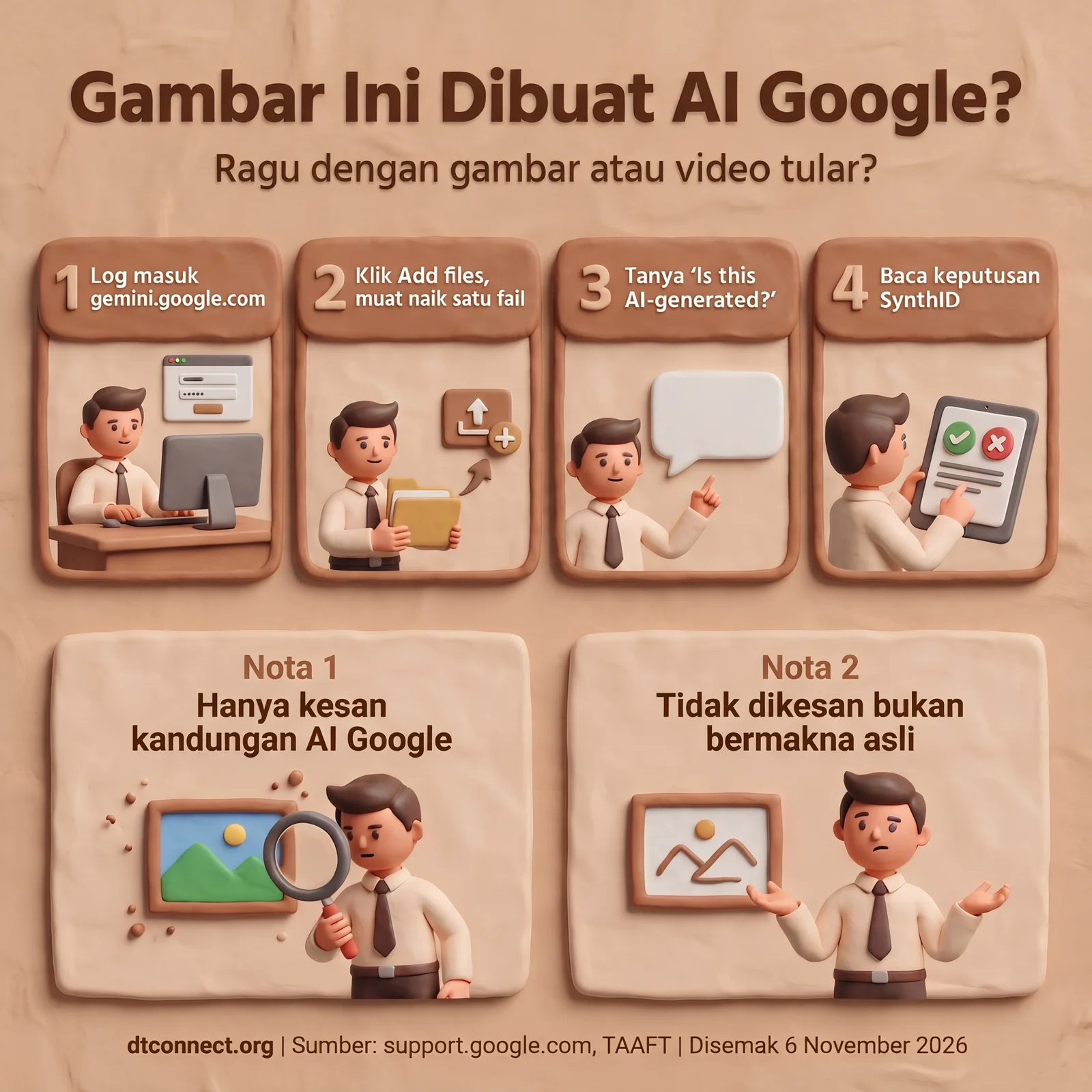
- Pergi ke gemini.google.com dan log masuk dengan akaun Google peribadi atau akaun Workspace yang layak.
- Klik Add files, kemudian pilih satu fail daripada peranti, Google Photos atau Google Drive.
- Jika fail itu tangkapan skrin, potong rapat pada gambar sahaja. Jangan muat naik kolaj.
- Tanya soalan semakan, contohnya “Is this AI-generated?”.
- Baca keputusan. Lihat sama ada SynthID dikesan atau tidak, dan semak juga sumber asal sebelum berkongsi.
Had dan perkara yang perlu diberi perhatian
Hanya kesan AI Google. Ini had paling penting. Gemini hanya mengenal pasti kandungan yang dibuat dengan alat AI Google. Syarikat lain yang mula menggunakan tanda air seperti SynthID belum boleh dikesan.
Tidak dikesan bukan bermakna asli. Jika keputusan menunjukkan “SynthID detected”, sebahagian atau keseluruhan fail itu dibuat atau disunting oleh AI Google. Jika tidak dikesan, fail itu mungkin bukan dibuat oleh AI Google. Namun ia masih mungkin dibuat oleh sistem AI lain.
Content Credentials bukan bukti muktamad. Maklumat ini tidak membuktikan secara pasti sama ada fail dibuat oleh AI. Ia hanya memberi maklumat asal usul untuk membantu anda menilai.
Suntingan boleh mengganggu. Tanda air biasanya kekal selepas saiz diubah, warna diubah atau fail dimampatkan. Tetapi pengesanan mungkin gagal selepas banyak perubahan. Keputusan “tidak jelas” juga boleh berlaku jika suntingan terlalu kecil.
Had fail dan kuota. Anda hanya boleh menyemak satu fail setiap kali, bersaiz 100 MB atau kurang. Video mesti bawah 90 saat dan audio bawah 1 jam. Dalam tempoh 24 jam bergerak, anda boleh membuat kira-kira 10 semakan gambar, 10 semakan video (jumlah sehingga 5 minit) dan 10 semakan audio (jumlah sehingga 3 jam).
Platform. Semakan Content Credentials tersedia di gemini.google.com dan aplikasi Gemini Android. Untuk iOS, Google hanya menyebut ia akan datang tidak lama lagi.
Privasi data. Fail yang anda semak akan dimuat naik ke Gemini. Elakkan memuat naik gambar peribadi orang lain tanpa keperluan. Untuk fail kerja yang sulit, ikut polisi data jabatan atau organisasi anda. Jika ragu, tanya pegawai IT dahulu.
Gunakan cara semakan lain juga. Google sendiri mencadangkan anda mencari kecacatan visual seperti teks berselerak, tangan atau gigi yang pelik dan bayang yang tidak konsisten. Anda juga boleh membuat carian imej terbalik (mencari gambar yang sama di internet) dan menyemak metadata (maklumat tersembunyi dalam fail) pada fail asal.
Sesuai untuk siapa
Alat ini sesuai untuk pekerja pejabat, guru dan ibu bapa yang kerap menerima gambar dan video tular dalam kumpulan WhatsApp. Ia juga berguna untuk pentadbir laman media sosial organisasi yang perlu menyemak bahan sebelum dikongsi.
Namun, alat ini bukan pengesan untuk semua kandungan AI. Ia paling berguna untuk menyemak kandungan AI Google.
Kesimpulan
Semakan SynthID dalam Gemini ialah langkah mudah dan percuma untuk menyemak gambar, video atau audio yang meragukan. Muat naik satu fail, tanya “Is this AI-generated?”, dan baca keputusannya. Ingat, alat ini hanya mengesan kandungan AI Google. Keputusan “tidak dikesan” bukan bukti fail itu asli. Jadi, semak juga sumber asal sebelum anda berkongsi. Cuba semak satu gambar tular hari ini.
Sumber
- Google Gemini Help, Verify AI-generated images, videos, and audio: support.google.com
- Google, Gemini Subscriptions: gemini.google
- Google Gemini Help, Where you can use Gemini Apps: support.google.com
- There’s An AI For That, carian Gemini: theresanaiforthat.com
Artikel ini bebas dan tidak ditaja. Ciri dan harga disemak pada 6 November 2026 dan mungkin berubah.
Read this article in English
A viral photo lands in your office WhatsApp group. It looks very convincing. Colleagues have already started forwarding it to other groups. You wonder whether the photo is real or made by AI (artificial intelligence).
Today, AI-generated images, videos and audio are increasingly hard to tell apart from real ones. If you share without checking, you may spread false information without realising it. But most people do not know where to start when checking.
The Gemini app now has a tool that can help. This article explains what it does, what it costs, how to use it and its limits.
What it does
The Gemini app has a verification tool to check whether an image, video or audio file was created or edited with AI. You need to sign in with a Google account.
The tool uses two technologies. First, SynthID, an invisible watermark (a hidden mark the eye cannot see) placed on content created or altered by Google AI models. Second, Content Credentials based on the C2PA standard, which show a file’s origin and editing history.
Key features
- Checks three file types: Images, videos and audio.
- SynthID detection: Identifies the invisible watermark added by Google AI tools.
- Content Credentials: Shows origin and editing history based on the C2PA standard.
- Upload from several places: Choose a file from your device, Google Photos or Google Drive.
- Plain questions: Official examples include “Is this AI-generated?”, “Is this a real video?” and “Was this image/video/audio created or edited by Google AI?”.
- Malay support: “Malay” is listed as a supported Gemini Apps language, and Malaysia is in the country list.
Pricing
The Gemini “Free” plan is USD 0 per month with a Google account. Paid plans on the US site are Google AI Plus at USD 4.99, Google AI Pro at USD 19.99 and Google AI Ultra from USD 99.99 per month. Google’s help page does not say whether the verification feature differs by plan. The There’s An AI For That (TAAFT) directory gave no clear pricing for this feature, so we follow the official site.
Prices were checked on 6 November 2026 and may change.
Getting started
- Go to gemini.google.com and sign in with a personal Google account or an eligible Workspace account.
- Click Add files and choose one file from your device, Google Photos or Google Drive.
- For screenshots, crop tightly to the image. Do not upload collages.
- Ask a verification question, such as “Is this AI-generated?”.
- Read the result. See whether SynthID was detected, and check the original source before sharing.
Limits and things to watch
Google AI only. This is the most important limit. Gemini only identifies content made with Google AI tools. Other companies that have started using watermarks like SynthID cannot be detected yet.
Not detected does not mean real. “SynthID detected” means part or all of the file was created or edited by Google AI. If it is not detected, the file may not have been made by Google AI, but it could still have been made by another AI system.
Content Credentials are not conclusive. They do not definitively prove whether a file was made by AI. They only provide origin information to help you judge.
Edits can interfere. The watermark usually survives resizing, colour changes and compression, but detection may fail after many changes. An “unclear” result can occur if edits are too small.
File limits and quota. One file at a time, 100 MB or less. Videos must be under 90 seconds and audio under 1 hour. In a rolling 24-hour period you get roughly 10 image checks, 10 video checks (up to 5 minutes in total) and 10 audio checks (up to 3 hours in total).
Platforms. Content Credentials checks are available on gemini.google.com and the Gemini Android app. For iOS, Google only says “soon”.
Data privacy. Files you check are uploaded to Gemini. Avoid uploading other people’s personal photos unnecessarily. For confidential work files, follow your organisation’s data policy and ask your IT officer if unsure.
Use other checks too. Google itself suggests looking for visual flaws such as garbled text, odd hands or teeth and inconsistent shadows, running a reverse image search and checking the original file’s metadata.
Who it is for
This tool suits office workers, teachers and parents who often receive viral photos and videos in WhatsApp groups. It also helps social media administrators who need to check material before sharing. It is not a detector for all AI content. It is most useful for checking Google AI content.
Conclusion
SynthID checking in Gemini is a simple, free step for checking a doubtful image, video or audio file. Upload one file, ask “Is this AI-generated?” and read the result. Remember, it only detects Google AI content, and “not detected” is not proof that a file is real. Check the original source before you share. Try checking one viral photo today.
Sources
- Google Gemini Help, Verify AI-generated images, videos, and audio: support.google.com
- Google, Gemini Subscriptions: gemini.google
- Google Gemini Help, Where you can use Gemini Apps: support.google.com
- There’s An AI For That, Gemini search: theresanaiforthat.com
This article is independent and not sponsored. Features and prices were checked on 6 November 2026 and may change.