 DIMENSI
AI or Not: Semak Gambar dan Teks Tular Sebelum Kongsi, Tetapi Jangan Anggap Keputusannya Muktamad
Group WhatsApp pejabat tiba-tiba kecoh dengan satu gambar yang nampak terlalu sempurna. Betul ke gambar itu, atau AI yang buat?
Ramai orang terus kongsi kerana percaya pada mata sendiri. Ada juga yang bertanya kepada chatbot, kemudian terus menerima jawapannya. Dalam kedua-dua keadaan, maklumat palsu boleh tersebar dengan cepat, dan nama baik anda turut terjejas.
AI or Not ialah satu alat yang boleh membantu anda berhenti sejenak dan menyemak dahulu. Dalam artikel ini, kami terangkan apa fungsinya, berapa harganya, cara bermula dan perkara yang anda perlu jaga, terutamanya tentang privasi dan ketepatan.
Apa fungsinya
AI or Not ialah perkhidmatan pengesanan kandungan janaan AI (kecerdasan buatan). Ia menyemak sama ada sesuatu imej, teks, video, muzik atau deepfake (video atau suara palsu yang meniru orang sebenar) dihasilkan oleh AI.
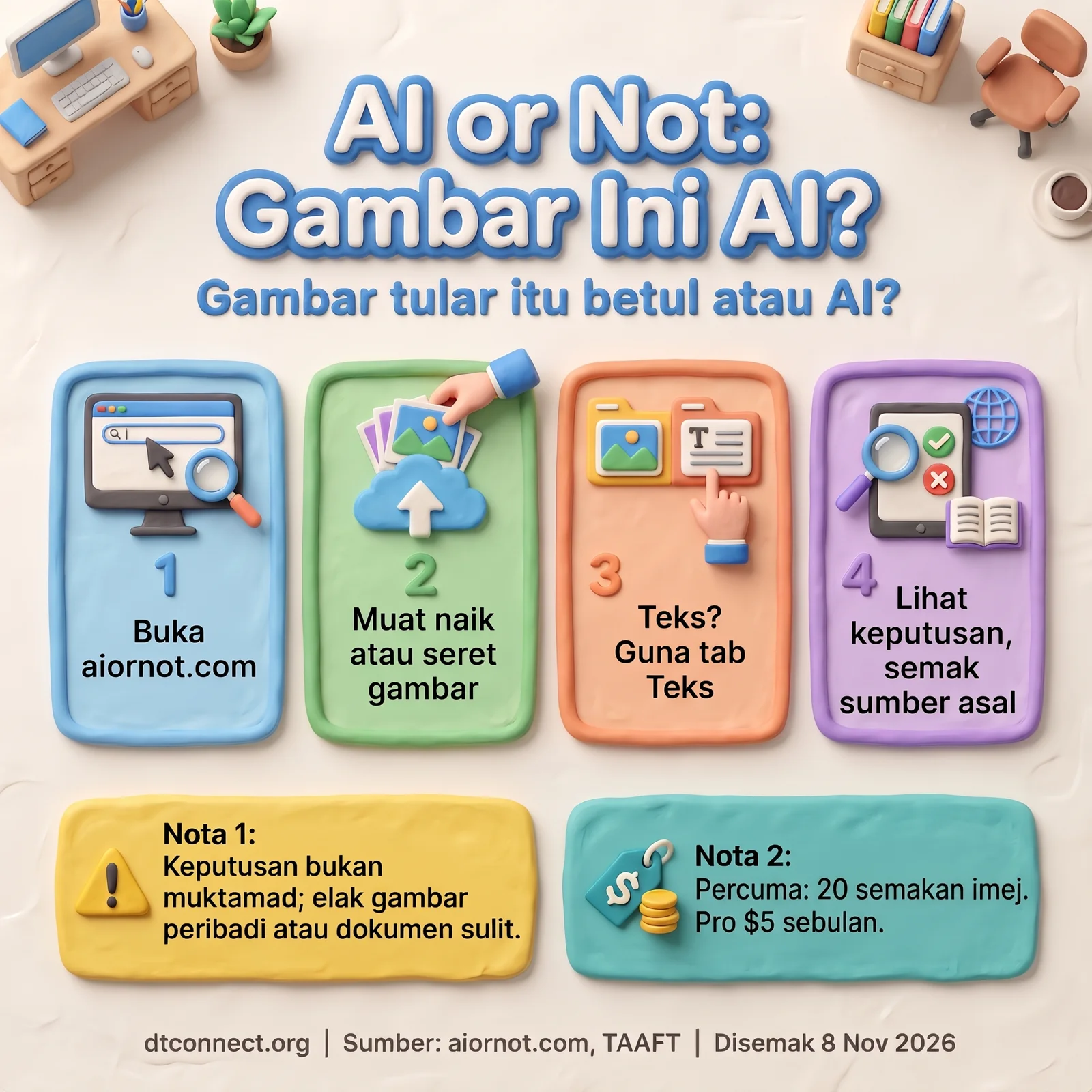
Caranya mudah. Anda muat naik fail melalui butang “Upload File”, atau seret dan lepas fail ke dalam kotak di laman tersebut. Untuk teks, ada tab Teks tempat anda menampal ayat yang hendak disemak.
Ciri utama
- Semakan imej: Laman syarikat menamakan imej daripada Midjourney sebagai contoh kandungan yang boleh dikesan.
- Semakan teks: Tampal teks dalam tab Teks. Contoh sumber yang dinamakan ialah ChatGPT dan Claude.
- Semakan muzik dan audio: Contoh yang dinamakan ialah Suno dan Udio. Fail audio MP3 juga diterima.
- Semakan video: Contoh yang dinamakan ialah Veo dan Kling.
- Semakan deepfake dan suara: Tersedia dalam pelan berbayar.
- Kunci API: API (sambungan supaya sistem lain boleh menggunakan alat ini secara automatik) disediakan, termasuk dalam pelan Free.
Harga
Halaman harga memaparkan simbol “$” tanpa kod mata wang. Kemungkinan besar ia dolar Amerika, tetapi ini tidak dinyatakan. Pelan yang dipaparkan:
- Free: Percuma. Termasuk kredit percuma $5, 1 juta perkataan semakan teks AI sebulan, 20 semakan imej AI dan kunci API. Hanya untuk teks dan imej.
- Pro: $5 sebulan. Kredit $10 sebulan, 2 juta perkataan, 500 semakan imej, 1,000 saat semakan video, serta semakan deepfake, suara dan muzik.
- Business: $100 sebulan. Kredit $100 sebulan, 20 juta perkataan, 6,600 semakan imej dan 13,300 saat semakan video.
- Enterprise: Harga khas melalui pasukan jualan.
Laman tersebut tidak menyatakan dengan jelas sama ada had 20 semakan imej pada pelan Free dikira setiap bulan atau sekali sahaja. Pilihan bil tahunan ada disebut, tetapi harganya tidak dipaparkan.
Harga disemak pada 8 November 2026 dan mungkin berubah.
Cara bermula
- Buka aiornot.com.
- Klik “Upload File” atau seret gambar ke dalam kotak.
- Untuk teks, pilih tab Teks dan tampal ayat yang hendak disemak.
- Lihat keputusan, kemudian semak juga sumber asal berita sebelum anda kongsi.
Had dan perkara yang perlu diberi perhatian
Keputusan bukan muktamad. Syarikat mendakwa ketepatan 98.9%. Ini dakwaan syarikat sendiri, bukan hasil ujian bebas. Jadi jangan anggap keputusan alat ini sebagai kata putus. Gunakannya sebagai satu petunjuk, dan sentiasa cari sumber asal berita atau gambar tersebut.
Privasi fail yang dimuat naik. Dasar privasi AI or Not menyatakan data peribadi disimpan selagi akaun dibuka atau selagi perlu untuk perkhidmatan. Namun, dasar itu tidak menerangkan secara khusus bagaimana fail yang dimuat naik disimpan, atau sama ada fail itu digunakan untuk melatih model AI. Hanya audio mesyuarat Zoom dinyatakan tidak digunakan untuk latihan. Oleh itu, jangan muat naik gambar peribadi atau dokumen sulit.
Perkongsian data. Dasar privasi juga menyatakan data peribadi boleh dikongsi dengan penyedia perkhidmatan (contohnya pengehosan dan pemproses bayaran Stripe), rakan analitik dan rakan perniagaan.
Had pelan Free. Pelan Free hanya meliputi teks dan imej, dengan 20 semakan imej. Untuk video, muzik, suara atau deepfake, anda perlu pelan berbayar.
Bahasa Melayu. Sokongan untuk teks Bahasa Melayu atau antara muka dalam Bahasa Melayu tidak dinyatakan. Keputusan untuk teks Bahasa Melayu mungkin kurang boleh dipercayai.
Pendaftaran akaun. Kami tidak dapat mengesahkan sama ada pelan Free memerlukan pendaftaran akaun.
Sesuai untuk siapa
AI or Not sesuai untuk pekerja pejabat, guru, ibu bapa dan sesiapa sahaja yang kerap menerima gambar atau mesej tular dalam kumpulan WhatsApp atau media sosial. Ia juga berguna untuk pegawai komunikasi yang perlu menyemak kandungan sebelum dikongsi secara rasmi.
Jika anda hanya mahu menyemak gambar atau teks sekali sekala, pelan Free sudah memadai untuk mencuba. Jika kerja anda melibatkan video atau audio, lihat pelan Pro.
Kesimpulan
AI or Not boleh membantu anda menyemak sama ada gambar atau teks mungkin dihasilkan oleh AI. Namun, keputusannya bukan muktamad, dan angka ketepatan 98.9% ialah dakwaan syarikat. Gunakan alat ini sebagai langkah pertama, kemudian semak sumber asal. Elakkan memuat naik gambar peribadi atau dokumen sulit. Cubalah sebelum anda tekan butang kongsi.
Sumber
- AI or Not, laman utama: aiornot.com
- AI or Not, pelan dan harga: aiornot.com
- AI or Not, Privacy Policy: aiornot.com
- There’s An AI For That, carian AI or Not: theresanaiforthat.com
Artikel ini bebas dan tidak ditaja. Ciri dan harga disemak pada 8 November 2026 dan mungkin berubah.
Read this article in English
The office WhatsApp group suddenly goes wild over a picture that looks a little too perfect. Is it real, or did AI make it?
Many people share it straight away because they trust their own eyes. Others ask a chatbot and simply accept its answer. Either way, false information can spread fast, and your own reputation can suffer too.
AI or Not is a tool that can help you pause and check first. In this article we explain what it does, how much it costs, how to get started and what to watch out for, especially around privacy and accuracy.
What it does
AI or Not is a service that detects AI-generated (artificial intelligence) content. It checks whether an image, text, video, music or deepfake (fake video or voice imitating a real person) was produced by AI.
It is simple to use. You upload a file with the “Upload File” button, or drag and drop the file into the box on the page. For text, there is a Text tab where you paste the words you want to check.
Key features
- Image checks: The company site names images from Midjourney as an example of content it can detect.
- Text checks: Paste text into the Text tab. Named example sources are ChatGPT and Claude.
- Music and audio checks: Named examples are Suno and Udio. MP3 audio files are also accepted.
- Video checks: Named examples are Veo and Kling.
- Deepfake and voice checks: Available on paid plans.
- API key: An API (a connection that lets other systems use the tool automatically) is provided, including on the Free plan.
Pricing
The pricing page shows a “$” symbol without a currency code. It is most likely US dollars, but this is not stated. Plans shown:
- Free: Free of charge. Includes $5 in free credits, 1 million words of AI text detection a month, 20 AI image checks and an API key. Text and images only.
- Pro: $5 a month. $10 in credits a month, 2 million words, 500 image checks, 1,000 seconds of video checks, plus deepfake, voice and music checks.
- Business: $100 a month. $100 in credits a month, 20 million words, 6,600 image checks and 13,300 seconds of video checks.
- Enterprise: Custom pricing through the sales team.
The page does not clearly state whether the 20 image checks on the Free plan are monthly or one-off. Annual billing is mentioned, but its prices are not shown.
Prices were checked on 8 November 2026 and may change.
Getting started
- Go to aiornot.com.
- Click “Upload File” or drag the picture into the box.
- For text, choose the Text tab and paste the words you want to check.
- Look at the result, then also check the original source of the news before you share.
Limits and things to watch
The result is not final. The company claims 98.9% accuracy. This is the company’s own claim, not the result of an independent test. So do not treat the tool’s result as the final word. Use it as one clue, and always look for the original source of the news or picture.
Privacy of uploaded files. The AI or Not privacy policy says personal data is kept for as long as the account is open or as long as needed for the service. However, the policy does not specifically explain how uploaded files are stored, or whether they are used to train AI models. Only Zoom meeting audio is stated as not used for training. So do not upload personal photos or confidential documents.
Data sharing. The privacy policy also says personal data may be shared with service providers (for example hosting and the payment processor Stripe), analytics partners and business partners.
Free plan limits. The Free plan covers only text and images, with 20 image checks. For video, music, voice or deepfakes, you need a paid plan.
Malay language. Support for Malay text or a Malay interface is not stated. Results for Malay text may be less reliable.
Account sign-up. We could not confirm whether the Free plan requires signing up for an account.
Who it is for
AI or Not suits office workers, teachers, parents and anyone who often receives viral pictures or messages in WhatsApp groups or on social media. It is also useful for communications officers who need to check content before sharing it officially.
If you only want to check a picture or some text now and then, the Free plan is enough to try it. If your work involves video or audio, look at the Pro plan.
Conclusion
AI or Not can help you check whether a picture or text may have been produced by AI. However, its result is not final, and the 98.9% accuracy figure is the company’s claim. Use the tool as a first step, then check the original source. Avoid uploading personal photos or confidential documents. Try it before you hit the share button.
Sources
- AI or Not, home page: aiornot.com
- AI or Not, plans and pricing: aiornot.com
- AI or Not, Privacy Policy: aiornot.com
- There’s An AI For That, AI or Not search: theresanaiforthat.com
This article is independent and not sponsored. Features and prices were checked on 8 November 2026 and may change.