 DIMENSI
Box AI: Ringkas Fail Syarikat dengan Kawalan Akses, Tetapi Fahami Dasar Datanya Dahulu
Syarikat anda menyimpan banyak fail dalam Box. Kini Box AI boleh membantu meringkaskan dokumen dan menjawab soalan tentang isinya. Tetapi ramai pekerja terus menggunakannya tanpa bertanya satu soalan penting: ke mana data saya pergi?
Kesilapan biasa ialah menganggap semua alat AI sama. Sebenarnya setiap syarikat ada dasar data sendiri. Artikel ini menerangkan apa yang Box nyatakan tentang data anda, dan tetapan yang boleh dikawal oleh pentadbir IT syarikat anda.
Apa fungsinya
Box AI ialah ciri AI (kecerdasan buatan) di dalam Box. Ia membantu anda bekerja dengan dokumen dan nota yang sudah disimpan dalam Box, contohnya untuk bertanya tentang isi sesuatu fail. Perkara yang paling penting untuk pejabat ialah cara Box AI mengendalikan kebenaran akses. Box menyatakan bahawa Box AI mematuhi kawalan dan dasar kebenaran yang sama yang menentukan akses kandungan di seluruh Box. Maksudnya, anda hanya boleh berinteraksi dengan fail yang anda memang dibenarkan untuk buka.
Tentang latihan AI, Box menggunakan rumusan yang berhati-hati. Dalam Box AI Principles, Box menyatakan bahawa ia tidak akan melatih model AI (sistem yang belajar daripada data) menggunakan kandungan pelanggan tanpa kebenaran jelas pelanggan. Perlu diambil perhatian, nada halaman sokongan Box sedikit berbeza. Halaman sokongan itu menyatakan Box tidak melatih menggunakan apa-apa data, dan vendor juga tidak melatih menggunakan data yang dihantar daripada Box. Oleh sebab dasar utama menyebut “tanpa kebenaran jelas”, anda patut faham bahawa latihan dengan kebenaran pelanggan tidak ditolak sepenuhnya dalam rumusan itu.
Ciri utama
- Ikut kebenaran akses fail: Box AI menggunakan kawalan kebenaran yang sama seperti Box. Anda hanya boleh berinteraksi dengan fail yang anda dibenarkan akses.
- Dasar latihan model: Box menyatakan ia tidak melatih model AI dengan kandungan pelanggan tanpa kebenaran jelas pelanggan.
- Model daripada beberapa vendor: Box AI menggunakan model asas (model AI besar yang menjadi enjin utama) daripada beberapa vendor, seperti Microsoft Azure, Google dan lain-lain.
- Soalan dan jawapan tidak disimpan: Halaman sokongan Box menyatakan Box tidak menyimpan soalan atau jawapan Box AI. Penyedia model memadam pertanyaan dan hasil selepas jawapan dipulangkan. Apabila dokumen ditutup, maklumat soal jawab dipadam daripada Box AI.
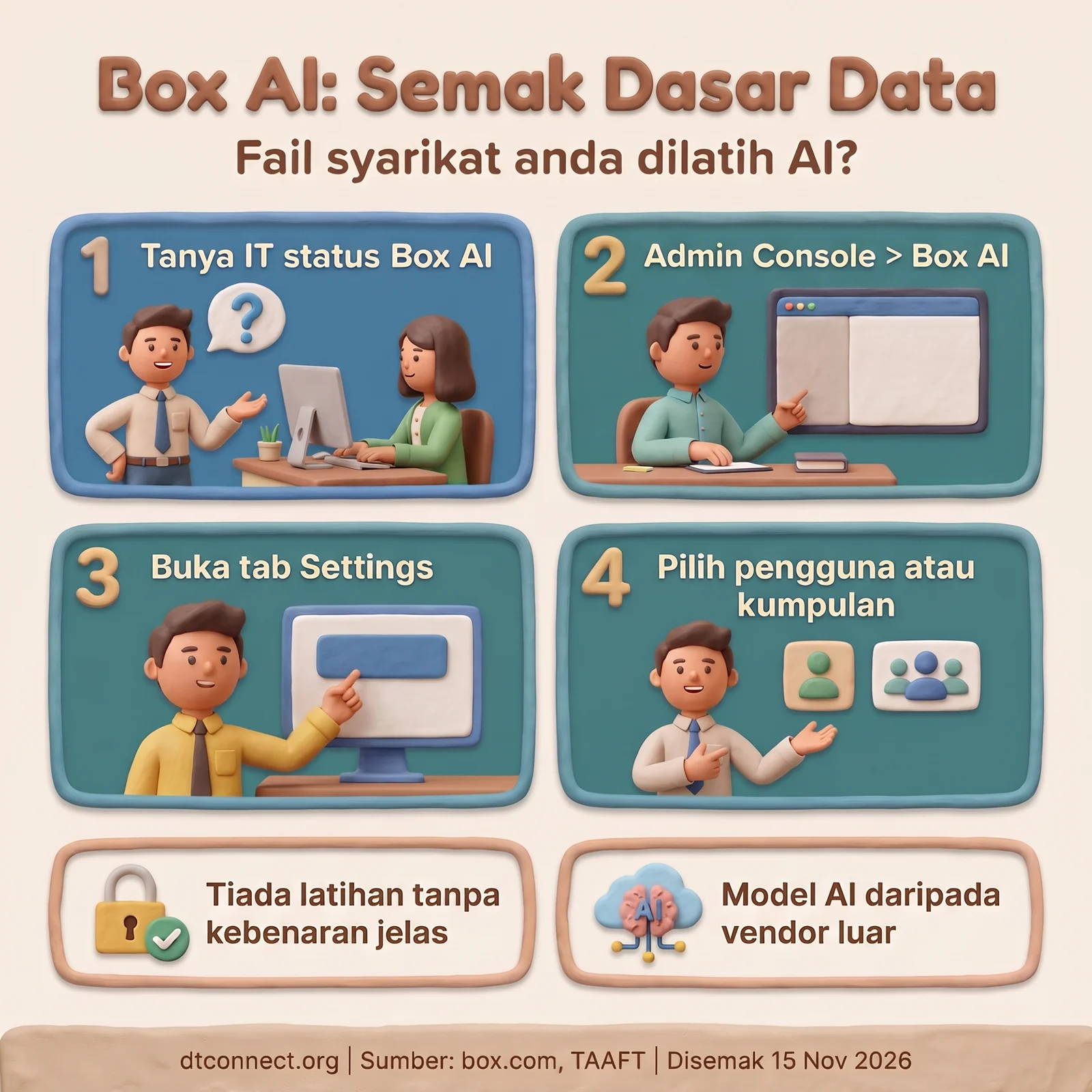
- Kawalan pentadbir: Pentadbir boleh menghidupkan atau mematikan Box AI di Admin Console, bahagian Box AI, tab Settings.
- Pilihan akses terperinci: Bagi setiap perkhidmatan, pentadbir boleh pilih matikan untuk semua, hidupkan untuk semua (pilihan lalai), hidupkan untuk pengguna dan kumpulan terpilih, atau hidupkan untuk semua kecuali pengguna dan kumpulan terpilih.
- Komitmen ketelusan: Box berjanji untuk telus tentang amalan AI, teknologi, vendor dan penggunaan datanya.
Harga
Laman rasmi Box tidak menyatakan harga berasingan untuk Box AI. Box AI for Documents and Notes disertakan dalam pelan Business, Business Plus dan Enterprise apabila tetapan Enable Box AI dihidupkan. Box AI APIs (antara muka untuk pembangun perisian) pula memerlukan pembelian Box AI Units.
Untuk pengguna individu, pelan Individual adalah percuma untuk seorang pengguna dengan storan 10 GB. Namun laman pelan itu tidak menyebut Box AI. Pelan Personal Pro dipaparkan pada harga $10 sebulan (harga asal $14 dipotong). Laman hanya memaparkan simbol “$” dan tidak menyatakan mata wang.
Harga disemak pada 15 November 2026 dan mungkin berubah.
Cara bermula
- Tanya pentadbir IT syarikat anda sama ada Box AI sudah dihidupkan untuk akaun anda, dan apa polisi syarikat tentang penggunaan AI.
- Pentadbir perlu menyemak dan menerima Box AI Product Addendum (dokumen syarat tambahan) sebelum menghidupkan Box AI.
- Pentadbir membuka Admin Console, kemudian bahagian Box AI, kemudian tab Settings.
- Pentadbir memilih sama ada Box AI dihidupkan untuk semua, untuk kumpulan tertentu sahaja, untuk semua kecuali kumpulan tertentu, atau dimatikan.
- Baca Box AI Principles bersama pasukan anda supaya semua orang faham dasar data yang terpakai.
Had dan perkara yang perlu diberi perhatian
- Bukan untuk pelan percuma: Box AI for Documents and Notes hanya untuk pelan Business, Business Plus dan Enterprise. Laman pelan Individual percuma tidak menyebut Box AI.
- Vendor luar terlibat: Model datang daripada vendor seperti Microsoft Azure dan Google. Jadi fail sulit tetap perlu dinilai dahulu mengikut polisi syarikat anda sebelum digunakan dengan Box AI.
- Perbezaan nada dalam dokumen rasmi: Box AI Principles menyebut “tanpa kebenaran jelas pelanggan”, manakala halaman sokongan menyatakan Box tidak melatih menggunakan apa-apa data. Rujuk dasar utama dan tanya pentadbir anda jika ragu.
- Maklumat pemadaman: Kenyataan bahawa penyedia model memadam pertanyaan selepas jawapan dipulangkan hanya terdapat pada halaman sokongan Box.
- Had senarai terpilih: Dokumentasi menyatakan senarai terpilih boleh memuatkan sehingga 100 nama atau e-mel dan 100 kumpulan.
- Tetapan lalai: Bagi setiap perkhidmatan, pilihan lalai ialah hidupkan untuk semua pengguna terurus. Pentadbir yang mahu lebih berhati-hati perlu mengubahnya sendiri.
Sesuai untuk siapa
Box AI sesuai untuk syarikat yang sudah menggunakan Box pada pelan Business, Business Plus atau Enterprise dan mahu membantu pekerja memahami dokumen dengan lebih cepat. Ia juga berguna untuk pentadbir IT yang menentukan siapa boleh menggunakannya.
Kesimpulan
Box AI mengikut kebenaran akses fail yang sedia ada, dan Box menyatakan ia tidak melatih model AI dengan kandungan pelanggan tanpa kebenaran jelas pelanggan. Pentadbir juga ada kawalan yang jelas di Admin Console. Namun model datang daripada vendor luar, dan nada dokumen rasmi Box tidak sepenuhnya sama. Langkah paling selamat: semak tetapan Box AI organisasi anda minggu ini dan ikut polisi syarikat untuk fail sulit.
Sumber
- Box AI Principles (box.com)
- Box AI Trust (laman kepercayaan AI Box)
- Halaman sokongan Box tentang data Box AI
- Dokumentasi Box: Configuring Box AI untuk pentadbir
- Harga pelan individu Box
Artikel ini bebas dan tidak ditaja. Ciri dan harga disemak pada 15 November 2026 dan mungkin berubah.
Read this article in English
Your company stores many files in Box. Now Box AI can help summarise documents and answer questions about their contents. But many employees start using it without asking one important question: where does my data go?
A common mistake is assuming all AI tools are the same. In fact, every company has its own data policy. This article explains what Box states about your data, and the settings your company’s IT admin can control.
What it does
Box AI is an AI (artificial intelligence) feature inside Box. It helps you work with documents and notes already stored in Box, for example by asking about the contents of a file. The most important point for the office is how Box AI handles access permissions. Box states that Box AI follows the same permission controls and policies that govern content access across Box. This means you can only interact with files you are actually allowed to open.
On AI training, Box uses careful wording. In its Box AI Principles, Box states that it won’t train AI models (systems that learn from data) using customer content without the customer’s explicit authorization. Note that the tone of a Box support page is slightly different. That support page states that Box does not train on any data, nor do any vendors train on any data that is sent from Box. Because the main policy says “without explicit authorization”, you should understand that training with customer permission is not fully ruled out in that wording.
Key features
- Follows file access permissions: Box AI uses the same permission controls as Box. You can only interact with files you are allowed to access.
- Model training policy: Box states it won’t train AI models on customer content without the customer’s explicit authorization.
- Models from several vendors: Box AI uses foundation models (large AI models that act as the main engine) from several vendors, such as Microsoft Azure, Google and others.
- Questions and answers not stored: A Box support page states that Box does not store Box AI questions or answers. Model providers delete queries and outputs after the answer is returned. When the document is closed, the Q and A information is deleted from Box AI.
- Admin control: Admins can turn Box AI on or off in the Admin Console, Box AI section, Settings tab.
- Detailed access options: For each service, admins can choose disable for all, enable for all (the default), enable for selected users and groups, or enable for all except selected users and groups.
- Transparency commitment: Box commits to being transparent about its AI practices, technology, vendors and data use.
Pricing
Box’s official site does not state a separate price for Box AI. Box AI for Documents and Notes is included in the Business, Business Plus and Enterprise plans when the Enable Box AI setting is turned on. Box AI APIs (interfaces for software developers) require the purchase of Box AI Units.
For individual users, the Individual plan is free for one user with 10 GB of storage. However, that plan page does not mention Box AI. The Personal Pro plan is shown at $10 per month (original price of $14 crossed out). The page only shows the “$” symbol and does not state the currency.
Prices were checked on 15 November 2026 and may change.
How to get started
- Ask your company’s IT admin whether Box AI is already enabled for your account, and what the company policy on AI use is.
- The admin must review and accept the Box AI Product Addendum (an additional terms document) before enabling Box AI.
- The admin opens the Admin Console, then the Box AI section, then the Settings tab.
- The admin chooses whether Box AI is enabled for everyone, for certain groups only, for everyone except certain groups, or disabled.
- Read the Box AI Principles with your team so everyone understands the data policy that applies.
Limits and things to watch
- Not for the free plan: Box AI for Documents and Notes is only for the Business, Business Plus and Enterprise plans. The free Individual plan page does not mention Box AI.
- Outside vendors are involved: Models come from vendors such as Microsoft Azure and Google. So confidential files should still be assessed first according to your company policy before being used with Box AI.
- Difference in tone in official documents: The Box AI Principles say “without the customer’s explicit authorization”, while the support page states that Box does not train on any data. Refer to the main policy and ask your admin if in doubt.
- Deletion information: The statement that model providers delete queries after the answer is returned appears only on the Box support page.
- Selected list limits: The documentation states a selected list can hold up to 100 names or emails and 100 groups.
- Default setting: For each service, the default option is enable for all managed users. Admins who want to be more careful need to change it themselves.
Who it is for
Box AI suits companies already using Box on the Business, Business Plus or Enterprise plans that want to help employees understand documents faster. It is also useful for IT admins who decide who can use it.
Conclusion
Box AI follows existing file access permissions, and Box states it won’t train AI models on customer content without the customer’s explicit authorization. Admins also have clear controls in the Admin Console. However, models come from outside vendors, and the tone of Box’s official documents is not fully the same. The safest step: check your organisation’s Box AI settings this week and follow company policy for confidential files.
Sources
- Box AI Principles (box.com)
- Box AI Trust page
- Box support page on Box AI data
- Box documentation: Configuring Box AI for admins
- Box individual plan pricing
This article is independent and not sponsored. Features and prices were checked on 15 November 2026 and may change.