 DIMENSI
Miro AI: Cara Mematikan Suis “Use data for Miro AI improvements” di Admin Console
Pasukan anda mungkin menggunakan Miro untuk sumbang saran, merancang projek atau menyusun idea mesyuarat. Ramai juga mula mencuba Miro AI (kecerdasan buatan dalam Miro) untuk menjana teks, imej atau sticky note dengan cepat.
Ramai tidak sedar bahawa pada pelan Free, gesaan dan kandungan yang anda pilih untuk Miro AI boleh dikumpul bagi penambahbaikan Miro AI. Cara yang salah ialah terus menggunakannya tanpa menyemak tetapan.
Artikel ini menerangkan apa yang dikumpul, siapa yang boleh mengubah tetapan ini, cara mematikannya dan had yang perlu anda tahu.
Apa fungsinya
Miro ialah papan putih dalam talian keluaran syarikat Miro. Dalam Admin Console (halaman pentadbiran akaun), terdapat satu suis berlabel “Use data for Miro AI improvements”. Suis ini menentukan sama ada data Miro AI pasukan anda boleh dikumpul untuk penambahbaikan Miro AI.
Menurut Miro, data yang dikumpul terbahagi kepada dua jenis:
- Input: gesaan (arahan yang anda taip kepada AI) dan kandungan yang dipilih sebagai konteks, seperti frame, imej dan sticky note.
- Output AI: imej, teks dan sticky note yang dijana oleh Miro AI.
Kandungan lain di papan yang tidak terlibat dalam pemprosesan AI tidak dikumpul. Pengumpulan ini terpakai kepada pengguna pelan Free bermula 3 Februari 2025. Guest dan Visitor pada pelan berbayar serta pelan Education dikecualikan.
Ciri utama
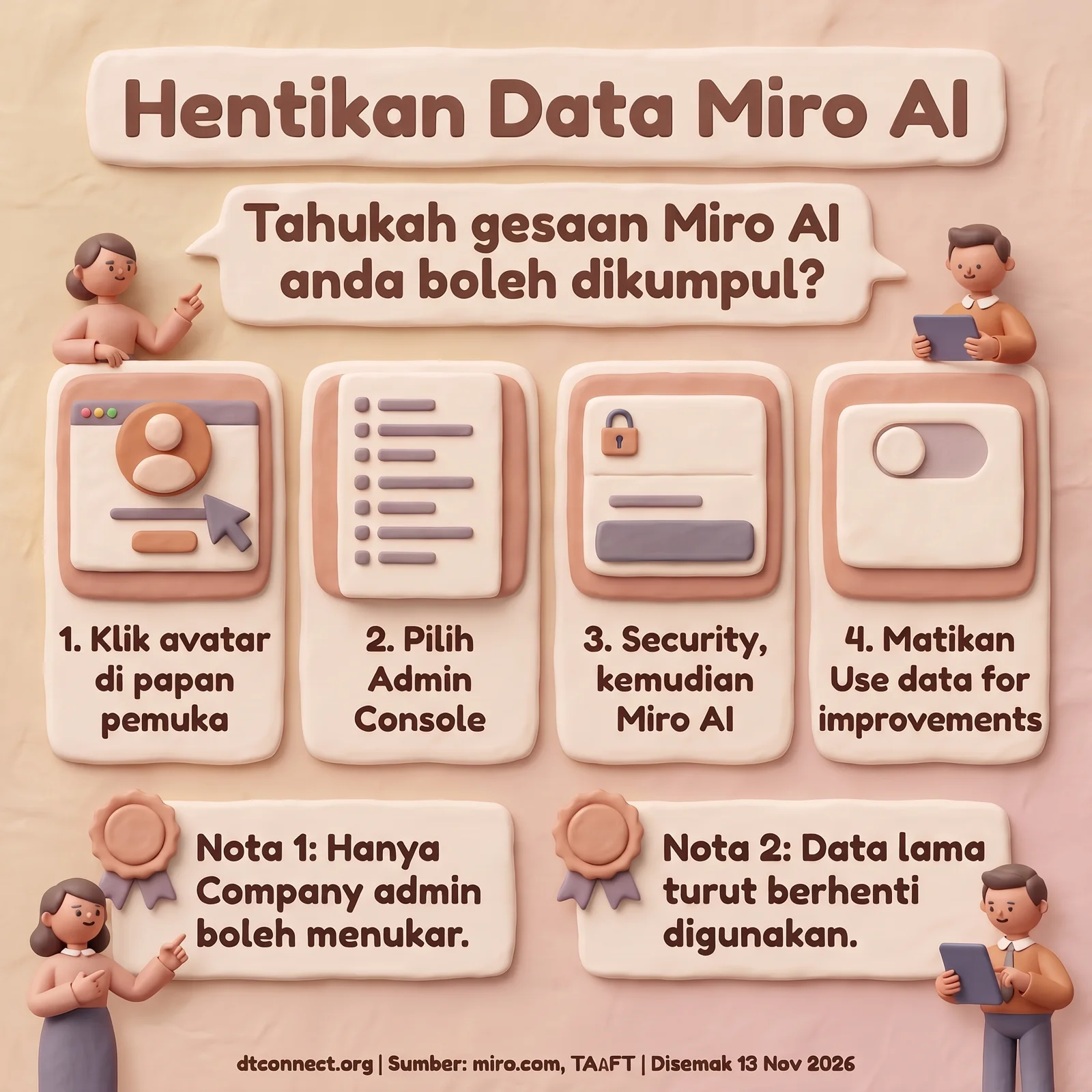
- Satu suis khas: Pengumpulan data dihentikan dengan mematikan suis “Use data for Miro AI improvements” di bahagian Security dalam Admin Console.
- Kawalan admin: Hanya Company admin boleh menukar tetapan ini. Admin pelan Free boleh mematikannya pada bila-bila masa.
- Data lama turut berhenti digunakan: Miro menyatakan bahawa mematikan tetapan ini juga menghentikan penggunaan data yang telah dikumpul untuk pembangunan AI.
- Miro AI kekal boleh digunakan: Mematikan tetapan ini tidak mengubah cara pengguna menggunakan Miro AI.
- Kawalan tambahan untuk Enterprise dan Education: Admin boleh memilih “No one can use”, “Everyone can use” atau “Specific teams can use” di Miro AI > Capabilities.
- Pihak ketiga: Miro menyatakan ia tidak berkongsi interaksi AI dengan penyedia model pihak ketiga untuk latihan model mereka.
Harga
Suis ini bukan produk berbayar. Ia relevan terutamanya kepada pelan Free. Laman harga Miro memaparkan harga dengan simbol $ sahaja, dan pautan pembeliannya mengandungi currency=usd:
- Free: $0. Termasuk 10 kredit AI sebulan, dan jadual harga melabelnya “Limited trial”.
- Starter: $8 sebulan bagi setiap ahli, dibilkan setiap tahun. Termasuk 25 kredit AI setiap ahli sebulan.
- Business: $20 sebulan bagi setiap ahli, dibilkan setiap tahun. Termasuk 50 kredit AI setiap ahli sebulan.
- Enterprise: Harga khas, bermula 30 ahli. Kredit bermula 2500 sebulan dan dikongsi seluruh organisasi.
Harga bulanan tidak dipaparkan. Soalan Lazim Miro menyatakan bil tahunan menjimatkan 20%.
Harga disemak pada 13 November 2026 dan mungkin berubah.
Cara bermula
Langkah ini hanya boleh dibuat oleh Company admin. Jika anda bukan admin, minta admin pasukan anda menyemaknya.
- Buka papan pemuka (dashboard) Miro dan klik avatar anda.
- Pilih Admin Console.
- Di bawah Security, pilih Miro AI.
- Matikan suis “Use data for Miro AI improvements”.
Had dan perkara yang perlu diberi perhatian
Hanya Company admin boleh mengubahnya. Ahli biasa tidak boleh mematikan suis ini sendiri. Maklumkan kepada admin jika anda risau tentang data pasukan.
Kedudukan lalai tidak dinyatakan. Laman bantuan Miro tidak menyatakan sama ada suis ini dihidupkan atau dimatikan secara lalai. Oleh itu, semak sendiri status suis dalam akaun anda.
Sekatan penuh hanya untuk pelan tertentu. Pilihan untuk menyekat Miro AI sepenuhnya, seperti “No one can use”, hanya tersedia untuk pelan Enterprise dan Education.
Lokasi pemprosesan. Miro menyatakan model AI mungkin dihoskan oleh Miro atau Microsoft Azure AI. Interaksi Miro AI juga mungkin diproses di luar rantau data (lokasi penyimpanan data) yang dipilih.
Jaga data peribadi. Walaupun suis dimatikan, jangan letak data peribadi pelanggan, murid atau rakan sekerja dalam gesaan Miro AI.
Bahasa Melayu. Sokongan bahasa Melayu untuk antara muka Miro tidak dinyatakan dalam sumber yang kami semak. Nama menu dalam artikel ini mengikut bahasa Inggeris.
Sesuai untuk siapa
Panduan ini sesuai untuk admin akaun Miro, pegawai IT dan ketua unit yang mengurus papan Miro jabatan. Ia juga berguna untuk guru, fasilitator bengkel dan pekerja pejabat yang menggunakan Miro AI pada pelan Free.
Jika organisasi anda memakai pelan Enterprise atau Education, minta admin menyemak juga tetapan di Miro AI > Capabilities untuk menentukan siapa yang boleh menggunakan Miro AI.
Kesimpulan
Suis “Use data for Miro AI improvements” ialah tetapan kecil yang penting untuk privasi pasukan anda. Pada pelan Free, gesaan, kandungan konteks dan output Miro AI boleh dikumpul bagi penambahbaikan Miro AI. Ingat tiga perkara: hanya Company admin boleh menukarnya, kedudukan lalainya tidak dinyatakan, dan Miro AI masih boleh digunakan selepas suis dimatikan. Semak tetapan ini sekarang juga.
Sumber
- Miro Help Center, Miro AI quality improvements: help.miro.com
- Miro Help Center, Miro AI Admin security: help.miro.com
- Miro, Pricing: miro.com
Artikel ini bebas dan tidak ditaja. Ciri dan harga disemak pada 13 November 2026 dan mungkin berubah.
Read this article in English
Your team may use Miro for brainstorming, project planning or organising meeting ideas. Many people have also started trying Miro AI (the artificial intelligence inside Miro) to generate text, images or sticky notes quickly.
Many people do not realise that on the Free plan, the prompts and content you select for Miro AI can be collected for Miro AI improvements. The wrong approach is to keep using it without checking the setting.
This article explains what is collected, who can change this setting, how to turn it off and the limits you should know about.
What it does
Miro is an online whiteboard from the company Miro. In the Admin Console (the account administration page), there is a switch labelled “Use data for Miro AI improvements”. This switch decides whether your team’s Miro AI data can be collected for Miro AI improvements.
According to Miro, the data collected falls into two types:
- Inputs: prompts (the instructions you type to the AI) and content selected as context, such as frames, images and sticky notes.
- AI outputs: images, text and sticky notes generated by Miro AI.
Other board content that is not involved in AI processing is not collected. This collection applies to Free plan users from 3 February 2025. Guests and Visitors on paid plans, as well as the Education plan, are excluded.
Key features
- One dedicated switch: Data collection is stopped by turning off the “Use data for Miro AI improvements” switch in the Security section of the Admin Console.
- Admin control: Only a Company admin can change this setting. Free plan admins can turn it off at any time.
- Older data also stops being used: Miro states that turning off this setting also stops data that has already been collected from being used for AI development.
- Miro AI stays usable: Turning off this setting does not change how users use Miro AI.
- Extra controls for Enterprise and Education: Admins can choose “No one can use”, “Everyone can use” or “Specific teams can use” under Miro AI > Capabilities.
- Third parties: Miro states that it does not share AI interactions with third-party model providers for training their models.
Pricing
This switch is not a paid product. It is mainly relevant to the Free plan. The Miro pricing page shows prices with the $ symbol only, and its purchase links contain currency=usd:
- Free: $0. Includes 10 AI credits a month, and the pricing table labels it “Limited trial”.
- Starter: $8 a month per member, billed annually. Includes 25 AI credits per member a month.
- Business: $20 a month per member, billed annually. Includes 50 AI credits per member a month.
- Enterprise: Custom pricing, starting from 30 members. Credits start at 2500 a month, shared across the whole organisation.
Monthly prices are not shown. The Miro FAQ states that annual billing saves 20%.
Prices were checked on 13 November 2026 and may change.
How to get started
Only a Company admin can carry out these steps. If you are not an admin, ask your team admin to check it.
- Open the Miro dashboard and click your avatar.
- Choose Admin Console.
- Under Security, choose Miro AI.
- Turn off the “Use data for Miro AI improvements” switch.
Limits and things to watch
Only a Company admin can change it. Regular members cannot turn this switch off themselves. Tell your admin if you are concerned about your team’s data.
The default position is not stated. The Miro help page does not say whether this switch is on or off by default. So check the switch status in your own account.
Full blocking only on certain plans. The option to block Miro AI completely, such as “No one can use”, is only available on the Enterprise and Education plans.
Processing location. Miro states that AI models may be hosted by Miro or Microsoft Azure AI. Miro AI interactions may also be processed outside the selected data region (the location where data is stored).
Protect personal data. Even with the switch off, do not put personal data about customers, pupils or colleagues into Miro AI prompts.
Malay language. Malay support for the Miro interface is not stated in the sources we checked. Menu names in this article follow the English interface.
Who it is for
This guide suits Miro account admins, IT officers and unit heads who manage a department’s Miro boards. It is also useful for teachers, workshop facilitators and office workers who use Miro AI on the Free plan.
If your organisation uses the Enterprise or Education plan, ask your admin to also check the settings under Miro AI > Capabilities to decide who can use Miro AI.
Conclusion
The “Use data for Miro AI improvements” switch is a small setting that matters for your team’s privacy. On the Free plan, prompts, context content and Miro AI outputs can be collected for Miro AI improvements. Remember three things: only a Company admin can change it, its default position is not stated, and Miro AI can still be used after the switch is turned off. Check this setting right now.
Sources
- Miro Help Center, Miro AI quality improvements: help.miro.com
- Miro Help Center, Miro AI Admin security: help.miro.com
- Miro, Pricing: miro.com
This article is independent and not sponsored. Features and prices were checked on 13 November 2026 and may change.