 DIMENSI
Zoho Writer dan Zia: Agenda dan Ringkasan Lebih Pantas, Tetapi Jaga Had 10,000 Aksara
Mesyuarat bermula jam sepuluh, tetapi agenda belum siap. Pada masa yang sama, ada laporan panjang yang perlu diringkaskan untuk ketua jabatan sebelum tengah hari.
Ramai orang menyalin seluruh dokumen pejabat ke dalam mana-mana chatbot tanpa berfikir panjang. Cara ini cepat, tetapi berisiko. Dokumen itu mungkin mengandungi maklumat sulit, dan anda tidak tahu ke mana data itu dihantar.
Zoho Writer ialah pemproses kata dalam talian (aplikasi menaip dokumen melalui pelayar web) yang ada pembantu AI (kecerdasan buatan) bernama Zia. Dalam artikel ini, kami terangkan apa fungsinya, harganya, cara bermula dan perkara yang anda perlu jaga.
Apa fungsinya
Zoho Writer dibangunkan oleh Zoho Corporation. Zia ialah pembantu penulisan AI di dalamnya. Menurut Zoho, Zia membantu anda mencipta, mengubah dan menyemak kandungan dokumen.
Untuk kerja pejabat, Zia boleh menjana draf seperti e-mel, senarai tugasan dan agenda mesyuarat. Ia juga boleh memendekkan, mengolah semula atau meringkaskan teks yang anda pilih. Jika dokumen anda panjang, Zia boleh meringkaskan seluruh dokumen sekali gus, tetapi ada had saiz yang perlu anda tahu.
Maksudnya, anda tidak perlu bermula dengan halaman kosong. Anda beri arahan, Zia sediakan draf, dan anda semak serta betulkan.
Ciri utama
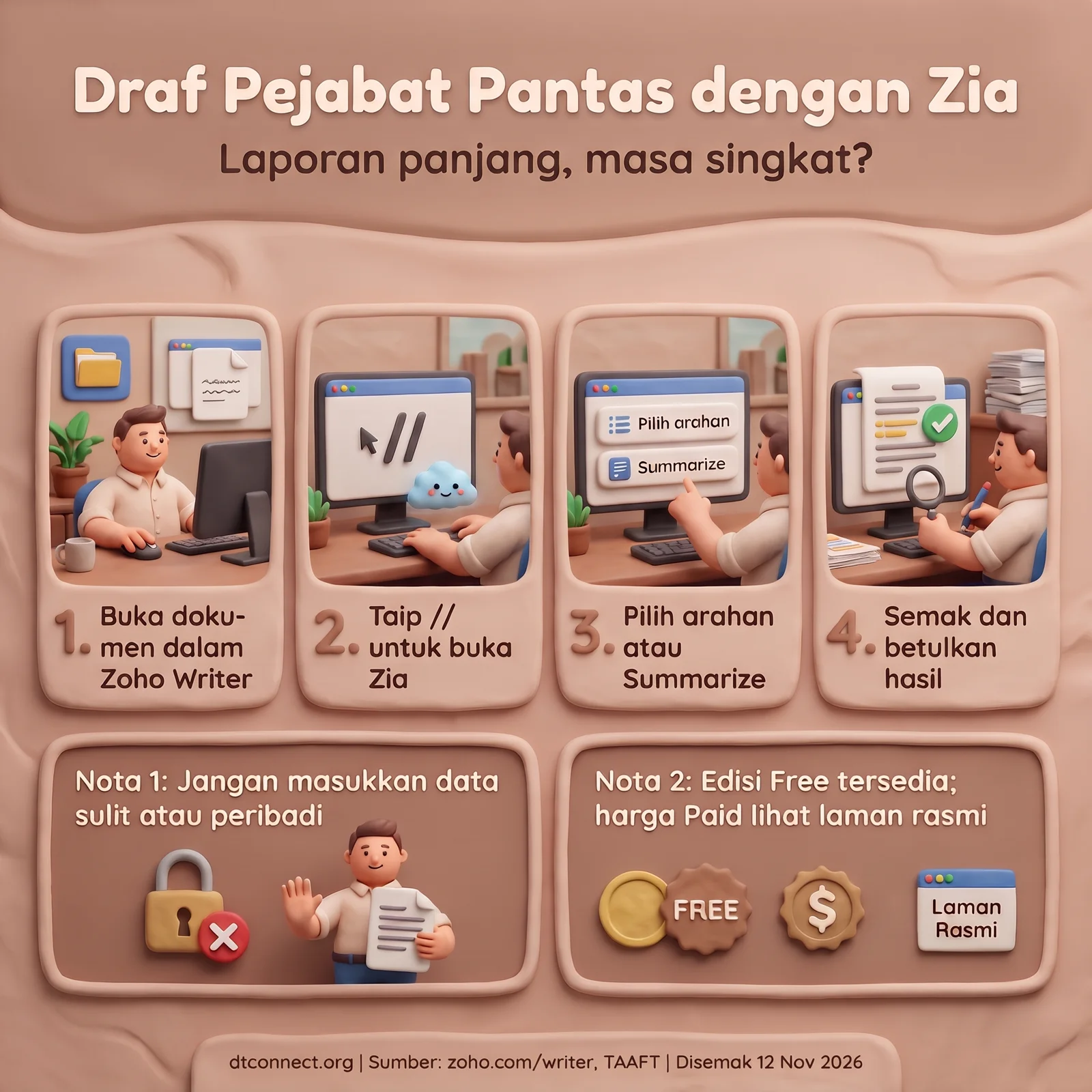
- Buka Zia dengan //: Taip dua garis condong (//) dalam editor untuk membuka tetingkap Zia. Anda juga boleh memilih teks dahulu, kemudian memilih arahan.
- Jana draf pejabat: E-mel, senarai tugasan dan agenda mesyuarat.
- Olah teks pilihan: Pendekkan, olah semula atau ringkaskan teks yang dipilih.
- Generate Summary: Ringkasan seluruh dokumen, terhad kepada dokumen sehingga 10,000 aksara buat masa ini.
- Document using AI: Cipta dokumen baharu melalui Create New, kemudian Document using AI. Writer menghasilkan tiga gaya, iaitu Professional, Modern dan Casual.
- Pilihan enjin AI: Anda boleh memilih AI Zoho (Zia) atau OpenAI. Untuk OpenAI, anda perlu memasukkan kunci API (kod akses peribadi) OpenAI anda sendiri.
- Terjemahan: Zia boleh menterjemah dokumen ke lebih 70 bahasa.
Harga
Laman harga rasmi menyatakan Zoho Writer percuma untuk individu dan organisasi, dan ada dua edisi:
- Free (untuk individu): Percuma.
- Paid (untuk perniagaan): Amaun harga tidak dipaparkan dalam teks laman yang kami semak. Pilihan mata wang yang tertera ialah USD, INR, EUR dan GBP, dan cukai tempatan (VAT atau GST) akan ditambah. Sila semak laman rasmi untuk harga terkini.
- Kredit automasi dokumen: Free mendapat 200 kredit sebulan bagi setiap organisasi. Paid mendapat 1,000 kredit sebulan.
- Tempoh bil: Tidak dapat disahkan daripada teks laman.
Laman rasmi tidak menyatakan sama ada semua ciri Zia termasuk dalam edisi Free. Jadi, jangan anggap semua ciri AI tersedia secara percuma.
Harga disemak pada 12 November 2026 dan mungkin berubah.
Cara bermula
- Daftar akaun dan buka dokumen baharu dalam Zoho Writer.
- Taip // dalam editor untuk membuka tetingkap Zia.
- Pilih arahan, contohnya agenda mesyuarat atau e-mel, dan terangkan apa yang anda perlukan.
- Untuk teks panjang, pilih teks itu dan minta Zia meringkaskannya. Untuk seluruh dokumen, guna Generate Summary.
- Baca semula hasilnya, betulkan yang salah, dan baru hantar.
Had dan perkara yang perlu diberi perhatian
Had ringkasan. Generate Summary hanya untuk dokumen sehingga 10,000 aksara buat masa ini. Untuk laporan yang lebih panjang, pilih dan ringkaskan bahagian demi bahagian.
Zia dalam edisi Free. Laman rasmi tidak menyatakan sama ada Zia, terutama ringkasan dan Document using AI, tersedia dalam edisi Free. Cuba dahulu dalam akaun anda.
Privasi data. Zoho menyatakan, “We do not use your data to train our AI model”, iaitu data anda tidak digunakan untuk melatih model AInya. Namun, data yang anda kongsi dengan alat AI pihak ketiga akan dihantar kepada pihak tersebut. Untuk integrasi ChatGPT, Zoho menyatakan hanya kandungan yang anda pilih akan dikongsi, dan mengesyorkan anda berhati-hati dengan maklumat peribadi. Jangan masukkan data peribadi pelanggan atau maklumat sulit jabatan.
Kunci API OpenAI. Jika anda memilih OpenAI, anda perlu memasukkan kunci API sendiri. Laman rasmi tidak menyatakan siapa yang menanggung kos penggunaan, jadi semak dengan pihak IT dahulu.
Bahasa Melayu. Sokongan Bahasa Melayu untuk menjana atau meringkaskan teks tidak dinyatakan. Senarai lebih 70 bahasa terjemahan juga tidak diperincikan. Cuba dengan teks pendek dahulu dan lihat hasilnya.
Ketepatan. AI boleh tersilap. Semak setiap nama, tarikh dan angka sebelum dokumen diedarkan.
Sesuai untuk siapa
Zoho Writer dengan Zia sesuai untuk pekerja pejabat, kerani, setiausaha dan pegawai pentadbiran yang kerap menyediakan agenda mesyuarat, e-mel dan ringkasan laporan. Ia juga sesuai untuk individu yang mahu pemproses kata dalam talian tanpa bayaran untuk edisi asas.
Jika organisasi anda mengendalikan maklumat sulit, dapatkan kebenaran pihak IT atau pengurusan sebelum menggunakan ciri AI.
Kesimpulan
Zoho Writer dan Zia boleh membantu anda menyiapkan draf agenda, e-mel dan ringkasan dengan lebih pantas, terus di dalam editor. Edisi Free Zoho Writer tersedia untuk individu, tetapi laman rasmi tidak menyatakan sama ada semua ciri Zia termasuk. Ingat tiga perkara: ringkasan seluruh dokumen terhad kepada 10,000 aksara, jangan masukkan data sulit, dan semak setiap hasil sebelum hantar.
Sumber
- Zoho, Zoho Writer Pricing: zoho.com
- Zoho, ChatGPT-powered writing assistant: zoho.com
- Zoho, Document summaries with Zia in Zoho Writer: zoho.com
- Zoho, Generate documents and templates using AI: help.zoho.com
- Zoho, AI in Zoho Workplace: zoho.com
- Zoho, Is Zia’s integration with OpenAI free as part of my Zoho subscription: help.zoho.com
Artikel ini bebas dan tidak ditaja. Ciri dan harga disemak pada 12 November 2026 dan mungkin berubah.
Read this article in English
The meeting starts at ten, but the agenda is not ready. At the same time, a long report needs to be summarised for the head of department before noon.
Many people copy an entire office document into any chatbot without thinking twice. This is fast, but risky. The document may contain confidential information, and you do not know where that data is sent.
Zoho Writer is an online word processor (an app for typing documents in a web browser) with an AI (artificial intelligence) assistant called Zia. In this article we explain what it does, its pricing, how to get started and what to watch out for.
What it does
Zoho Writer is developed by Zoho Corporation. Zia is the AI writing assistant inside it. According to Zoho, Zia helps you create, change and review document content.
For office work, Zia can generate drafts such as emails, to-do lists and meeting agendas. It can also shorten, rephrase or summarise text you select. If your document is long, Zia can summarise the whole document at once, but there is a size limit you should know about.
This means you do not have to start from a blank page. You give an instruction, Zia prepares a draft, and you check and correct it.
Key features
- Open Zia with //: Type two forward slashes (//) in the editor to open the Zia window. You can also select text first, then choose a command.
- Generate office drafts: Emails, to-do lists and meeting agendas.
- Rework selected text: Shorten, rephrase or summarise selected text.
- Generate Summary: A summary of the whole document, currently limited to documents of up to 10,000 characters.
- Document using AI: Create a new document through Create New, then Document using AI. Writer produces three styles: Professional, Modern and Casual.
- Choice of AI engine: You can choose Zoho’s AI (Zia) or OpenAI. For OpenAI, you need to enter your own OpenAI API key (a personal access code).
- Translation: Zia can translate documents into over 70 languages.
Pricing
The official pricing page states that Zoho Writer is free for individuals and organisations, and there are two editions:
- Free (for individuals): Free.
- Paid (for businesses): The price amount is not shown in the page text we checked. The currency options listed are USD, INR, EUR and GBP, and local taxes (VAT or GST) are added. Please check the official page for current prices.
- Document automation credits: Free gets 200 credits a month per organisation. Paid gets 1,000 credits a month.
- Billing period: Could not be confirmed from the page text.
The official page does not state whether all Zia features are included in the Free edition. So do not assume all AI features are available for free.
Prices were checked on 12 November 2026 and may change.
How to get started
- Sign up and open a new document in Zoho Writer.
- Type // in the editor to open the Zia window.
- Choose a command, for example meeting agenda or email, and describe what you need.
- For long text, select it and ask Zia to summarise it. For the whole document, use Generate Summary.
- Read the result again, correct anything wrong, and only then send it.
Limits and things to watch
Summary limit. Generate Summary currently works only for documents of up to 10,000 characters. For longer reports, select and summarise one section at a time.
Zia in the Free edition. The official pages do not state whether Zia, especially summaries and Document using AI, is available in the Free edition. Try it in your own account first.
Data privacy. Zoho states, “We do not use your data to train our AI model”. However, data you share with third-party AI tools will be sent to those parties. For the ChatGPT integration, Zoho states that only the content you select will be shared, and recommends caution with personal information. Do not enter customers’ personal data or confidential department information.
OpenAI API key. If you choose OpenAI, you need to enter your own API key. The official page does not state who pays the usage costs, so check with IT first.
Malay language. Support for Malay when generating or summarising text is not stated. The list of over 70 translation languages is not detailed either. Try a short text first and see the result.
Accuracy. AI can make mistakes. Check every name, date and number before the document is circulated.
Who it is for
Zoho Writer with Zia suits office workers, clerks, secretaries and administrative officers who often prepare meeting agendas, emails and report summaries. It also suits individuals who want an online word processor with no charge for the basic edition.
If your organisation handles confidential information, get permission from IT or management before using the AI features.
Conclusion
Zoho Writer and Zia can help you finish drafts of agendas, emails and summaries more quickly, right inside the editor. The Free edition of Zoho Writer is available for individuals, but the official pages do not state whether all Zia features are included. Remember three things: full-document summaries are limited to 10,000 characters, do not enter confidential data, and check every result before sending.
Sources
- Zoho, Zoho Writer Pricing: zoho.com
- Zoho, ChatGPT-powered writing assistant: zoho.com
- Zoho, Document summaries with Zia in Zoho Writer: zoho.com
- Zoho, Generate documents and templates using AI: help.zoho.com
- Zoho, AI in Zoho Workplace: zoho.com
- Zoho, Is Zia’s integration with OpenAI free as part of my Zoho subscription: help.zoho.com
This article is independent and not sponsored. Features and prices were checked on 12 November 2026 and may change.