 DIMENSI
DeepL: Terjemah Laporan Bahasa Inggeris ke Bahasa Melayu dengan Pantas, Tetapi Jaga Dokumen Sulit
Bos minta laporan dalam bahasa Inggeris itu diterjemah ke Bahasa Melayu sebelum makan tengah hari. Masa pula sangat suntuk.
Ramai orang menyalin satu perenggan demi satu ke alat terjemahan, kemudian menyusun semula format dokumen dengan tangan. Cara ini lambat. Ia juga mudah silap, contohnya perenggan tertinggal atau jadual menjadi bersepah.
DeepL ialah satu alat yang boleh membantu. Dalam artikel ini, kami terangkan apa fungsinya, berapa harganya, cara bermula dan perkara yang anda perlu jaga, terutamanya tentang dokumen sulit.
Apa fungsinya
DeepL Translator ialah alat terjemahan AI (kecerdasan buatan). Ia boleh menterjemah teks yang anda tampal, dan juga fail penuh. Untuk fail, anda muat naik atau seret fail ke tetingkap DeepL, pilih bahasa sasaran, kemudian muat turun hasilnya.
Bahasa Melayu disokong. Namun, menurut laman bantuan DeepL, Bahasa Melayu hanya tersedia melalui “next-generation language model” (model bahasa generasi baharu) DeepL. Ia disenaraikan dalam jadual “Additional languages” (bahasa tambahan).
Ciri utama
- Terjemahan teks: Tampal teks anda dan pilih bahasa sasaran.
- Terjemahan fail: Muat naik atau seret fail ke tetingkap, pilih bahasa sasaran dan muat turun hasil terjemahan.
- Pelbagai jenis fail: Jenis fail yang disebut termasuk PDF (digital dan imbasan), Word, PowerPoint, Excel, HTML, SRT (fail sari kata) dan TXT.
- Sokongan Bahasa Melayu: Melalui model bahasa generasi baharu DeepL, dalam senarai bahasa tambahan.
- Glosari: Senarai istilah anda sendiri. Pelan Free memberi 1 glosari dengan 5 entri bagi setiap pasangan bahasa. Namun, ciri ini tidak disokong untuk Bahasa Melayu (lihat bahagian Had).
Harga
DeepL ada pelan Free. Hadnya bagi setiap pengguna, sebulan:
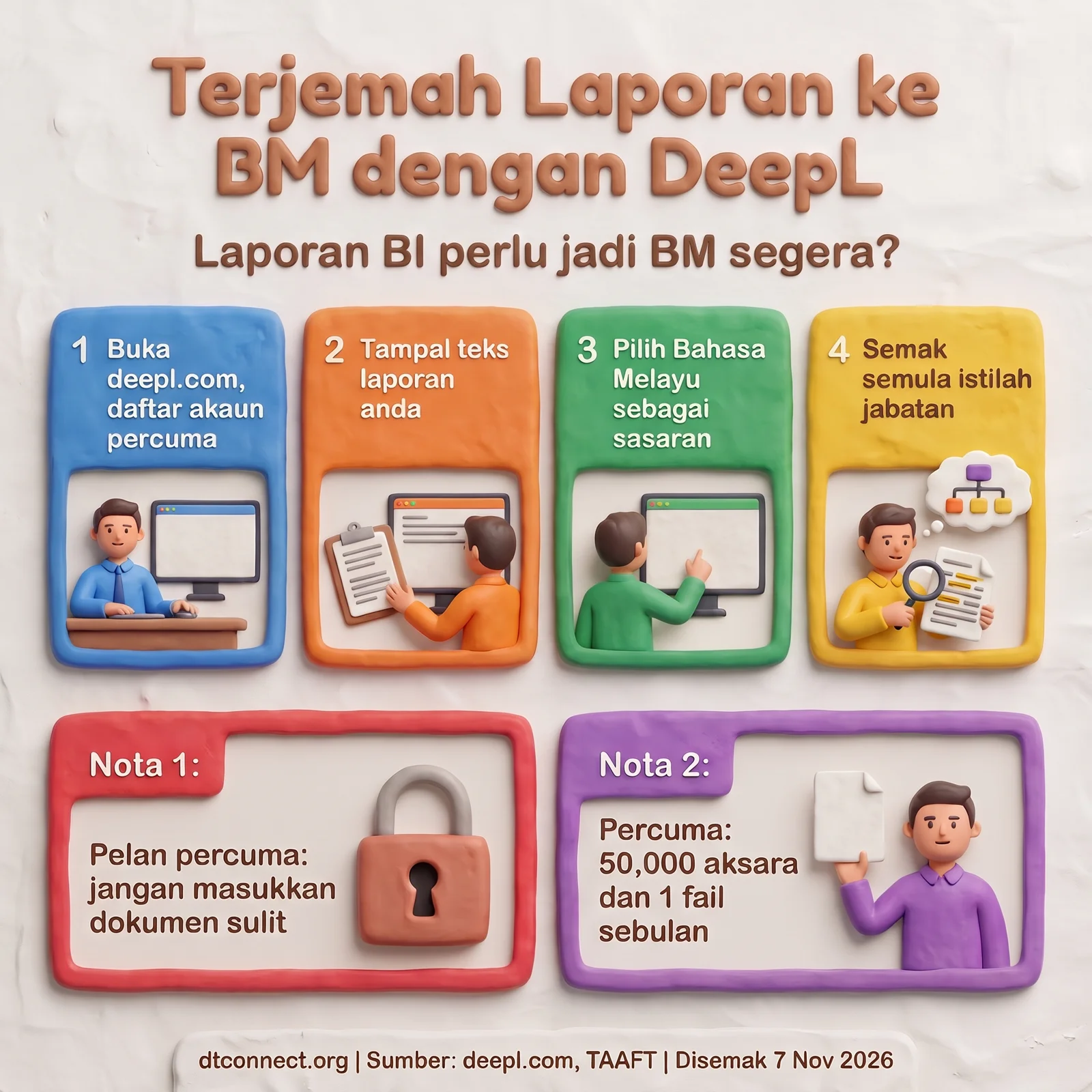
- 50,000 aksara teks.
- 1 terjemahan fail.
- Saiz fail maksimum 5 MB.
- 1 glosari (5 entri bagi setiap pasangan bahasa).
- 1 terjemahan disimpan.
Ingat juga bahawa setiap bahasa sasaran dikira sebagai satu terjemahan fail daripada kuota bulanan anda. Jadi pelan Free hanya cukup untuk satu fail ke satu bahasa sebulan.
Laman harga DeepL yang kami lihat memaparkan harga untuk Jerman, dalam EUR, termasuk VAT (cukai nilai tambah) dan dengan bil tahunan:
- Individual: EUR 7.49 sebulan. Ia memberi 3 terjemahan fail sebulan, fail sehingga 30 MB dan 300,000 aksara sebulan.
- Team: EUR 24.99 seorang sebulan.
- Business: EUR 49.99 seorang sebulan.
- Enterprise: Ikut sebut harga.
Harga dalam RM untuk Malaysia tidak dipaparkan, dan harga bil bulanan juga tidak ditunjukkan. Semak laman DeepL dari lokasi anda sendiri sebelum membeli.
Harga disemak pada 7 November 2026 dan mungkin berubah.
Cara bermula
- Buka deepl.com dan daftar akaun percuma.
- Tampal teks yang hendak diterjemah. Pastikan teks itu tidak sulit dan tiada data peribadi.
- Pilih Bahasa Melayu sebagai bahasa sasaran.
- Baca semula hasilnya dan betulkan istilah jabatan anda, nama pegawai serta angka.
Had dan perkara yang perlu diberi perhatian
Dokumen sulit dan data peribadi. Ini perkara paling penting. Terma penggunaan DeepL menyatakan anda tidak boleh menggunakan perkhidmatan percuma untuk kandungan sulit atau data peribadi. Ini hanya dibenarkan dalam langganan DeepL Pro. Jangan masukkan surat rasmi sulit, maklumat pelanggan atau data pekerja ke dalam pelan Free.
Latihan sistem. Bagi pelan Free, DeepL “reserve the right” (berhak) memproses kandungan yang anda muat naik, sama ada teks atau dokumen, untuk melatih sistemnya bagi tempoh terhad. Bagi pelanggan Pro pula, DeepL menyatakan data tidak digunakan untuk melatih model AI mereka, dan teks disimpan sementara sahaja lalu dipadam. Ini dakwaan syarikat, bukan semakan kami.
Ciri terhad untuk Bahasa Melayu. Bagi bahasa tambahan seperti Bahasa Melayu, ciri glosari, pilihan nada formal atau tidak formal, dan “alternatives” (cadangan terjemahan lain) tidak disokong. Jadi anda perlu membetulkan istilah sendiri.
Terjemahan fail ke Bahasa Melayu. Kami tidak menemui laman rasmi yang mengesahkan sama ada terjemahan fail ke Bahasa Melayu tersedia. Sebab itu langkah di atas menggunakan cara tampal teks. Cuba sendiri dengan fail yang tidak sulit.
Had pelan Free. 50,000 aksara dan 1 terjemahan fail sebulan mungkin cepat habis jika anda kerap menterjemah laporan panjang.
Ketepatan. Terjemahan AI boleh tersilap, terutamanya istilah khusus jabatan. Sentiasa baca semula sebelum menghantar dokumen kepada orang lain.
Sesuai untuk siapa
DeepL sesuai untuk pekerja pejabat, pegawai tadbir dan setiausaha yang kadang kala perlu menterjemah e-mel, makluman atau laporan dari bahasa Inggeris ke Bahasa Melayu.
Jika anda hanya menterjemah teks umum yang tidak sulit, pelan Free sudah memadai untuk mencuba. Jika kerja anda melibatkan dokumen sulit atau data peribadi, bincang dengan majikan anda tentang langganan DeepL Pro dan ikut dasar data organisasi anda.
Kesimpulan
DeepL boleh membantu anda menterjemah teks ke Bahasa Melayu dengan lebih cepat berbanding menyalin satu perenggan demi satu. Mulakan dengan pelan Free menggunakan dokumen yang tidak sulit. Ingat had 50,000 aksara dan satu fail sebulan, dan semak setiap hasil terjemahan sebelum digunakan.
Sumber
- DeepL Help Center, Translate files with DeepL file translation: support.deepl.com
- DeepL, Document translation: deepl.com
- DeepL Help Center, Languages supported by DeepL: support.deepl.com
- DeepL Pro, pelan dan harga: deepl.com
- DeepL, Terms of Use: deepl.com
- There’s An AI For That, carian DeepL: theresanaiforthat.com
Artikel ini bebas dan tidak ditaja. Ciri dan harga disemak pada 7 November 2026 dan mungkin berubah.
Read this article in English
Your boss wants that English report translated into Malay before lunch. Time is very tight.
Many people copy one paragraph at a time into a translation tool, then rebuild the document format by hand. This is slow. It is also easy to make mistakes, such as missing a paragraph or ending up with messy tables.
DeepL is a tool that can help. In this article we explain what it does, how much it costs, how to get started and what to watch out for, especially with confidential documents.
What it does
DeepL Translator is an AI (artificial intelligence) translation tool. It can translate text you paste in, and also whole files. For files, you upload or drag the file into the DeepL window, choose the target language, then download the result.
Malay is supported. However, according to DeepL’s help centre, Malay is only available through DeepL’s “next-generation language model”. It is listed in the “Additional languages” table.
Key features
- Text translation: Paste your text and choose the target language.
- File translation: Upload or drag a file into the window, choose the target language and download the translated result.
- Many file types: File types mentioned include PDF (digital and scanned), Word, PowerPoint, Excel, HTML, SRT (subtitle files) and TXT.
- Malay support: Through DeepL’s next-generation language model, in the additional languages list.
- Glossary: Your own list of terms. The Free plan gives 1 glossary with 5 entries per language pair. However, this feature is not supported for Malay (see Limits).
Pricing
DeepL has a Free plan. Its limits per user, per month: 50,000 text characters, 1 file translation, a maximum file size of 5 MB, 1 glossary (5 entries per language pair) and 1 saved translation. Each target language counts as one file translation against your monthly quota, so the Free plan only covers one file into one language a month.
The DeepL pricing page we saw showed prices for Germany, in EUR, including VAT and billed annually: Individual EUR 7.49 a month (3 file translations a month, files up to 30 MB and 300,000 characters a month), Team EUR 24.99 per user a month, Business EUR 49.99 per user a month, and Enterprise on quotation.
Prices in RM for Malaysia were not shown, and monthly billing prices were not displayed either. Check the DeepL page from your own location before buying.
Prices were checked on 7 November 2026 and may change.
Getting started
- Go to deepl.com and sign up for a free account.
- Paste the text you want to translate. Make sure it is not confidential and contains no personal data.
- Choose Malay as the target language.
- Read the result again and correct your department’s terms, officers’ names and figures.
Limits and things to watch
Confidential documents and personal data. This is the most important point. DeepL’s terms of use state that you may not use the free service for confidential content or personal data. This is only allowed with a DeepL Pro subscription. Do not put confidential official letters, customer information or staff data into the Free plan.
System training. For the Free plan, DeepL “reserve the right” to process content you upload, whether text or documents, to train its systems for a limited period. For Pro customers, DeepL states data is “never used to train DeepL’s AI models”, and text is stored only temporarily and then deleted. These are the company’s claims, not our own checks.
Limited features for Malay. For additional languages such as Malay, glossaries, formal or informal tone and “alternatives” are not supported. So you need to correct terms yourself.
File translation into Malay. We did not find an official page confirming whether file translation into Malay is available. That is why the steps above use pasted text. Try it yourself with a non-confidential file.
Free plan limits. 50,000 characters and 1 file translation a month may run out quickly if you often translate long reports.
Accuracy. AI translation can make mistakes, especially with department-specific terms. Always read it again before sending the document to others.
Who it is for
DeepL suits office workers, administrative officers and secretaries who sometimes need to translate emails, notices or reports from English into Malay. If you only translate general, non-confidential text, the Free plan is enough to try it. If your work involves confidential documents or personal data, talk to your employer about a DeepL Pro subscription and follow your organisation’s data policy.
Conclusion
DeepL can help you translate text into Malay faster than copying one paragraph at a time. Start with the Free plan using non-confidential documents. Remember the limit of 50,000 characters and one file a month, and check every translation before using it.
Sources
- DeepL Help Center, Translate files with DeepL file translation: support.deepl.com
- DeepL, Document translation: deepl.com
- DeepL Help Center, Languages supported by DeepL: support.deepl.com
- DeepL Pro, plans and pricing: deepl.com
- DeepL, Terms of Use: deepl.com
- There’s An AI For That, DeepL search: theresanaiforthat.com
This article is independent and not sponsored. Features and prices were checked on 7 November 2026 and may change.