 DIMENSI
ChatGPT Temporary Chat: Sembang Tanpa Sejarah, Apa yang Masih Disimpan
Anda sedang menyiapkan laporan di pejabat. Anda mahu tanya ChatGPT satu soalan pantas tentang tugasan itu. Tetapi anda teragak-agak. Adakah sembang ini akan tersimpan dalam sejarah akaun? Adakah ia akan digunakan untuk melatih AI (kecerdasan buatan)?
Ramai pekerja terus menaip tanpa menyemak tetapan. Selepas beberapa bulan, senarai sejarah sembang penuh dengan perbualan kerja, soalan peribadi dan draf yang bercampur aduk.
ChatGPT ada satu ciri untuk situasi ini, iaitu Temporary Chat (sembang sementara). Dalam artikel ini, kami terangkan apa yang ciri ini buat, apa yang masih disimpan, cara menggunakannya dan perkara yang anda perlu jaga.
Apa fungsinya
Temporary Chat ialah mod sembang khas dalam ChatGPT. Apabila anda menggunakan mod ini, ChatGPT tidak membaca dan tidak mencipta memori (maklumat tentang anda yang disimpan untuk menyesuaikan jawapan). Menurut halaman bantuan OpenAI, ChatGPT “won’t access or create memories” dalam mod ini.
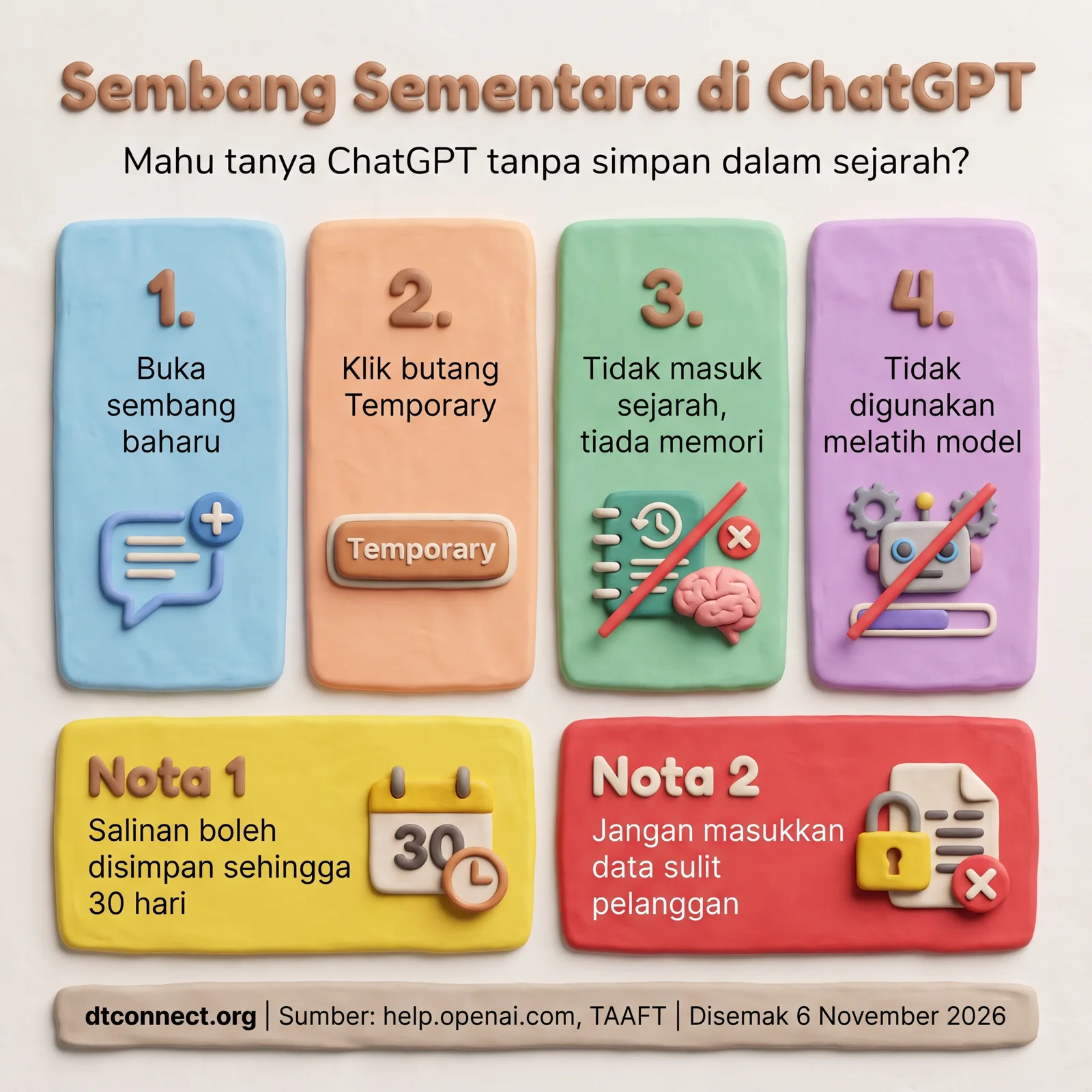
Ada tiga perkara utama yang perlu anda ingat. Pertama, sembang ini tidak muncul dalam sejarah sembang anda. Kedua, sembang ini tidak digunakan untuk menambah baik (melatih) model OpenAI. Ketiga, OpenAI masih boleh menyimpan salinan sehingga 30 hari atas sebab keselamatan. Jadi, “sementara” tidak bermaksud sembang itu hilang serta-merta.
Temporary Chat juga berbeza daripada Kawalan Data (Data Controls) dalam tetapan akaun. Dahulu, ChatGPT ada satu tetapan bernama “Chat history & model training”. Tetapan ini kemudian dipecahkan kepada dua ciri. Yang pertama ialah Temporary Chat, yang anda pilih bagi setiap sembang. Yang kedua ialah “Improve the model for everyone”, iaitu tetapan akaun yang terpakai pada semua sembang biasa anda. Untuk penerangan tetapan akaun itu, baca artikel Dimensi sebelum ini tentang Kawalan Data ChatGPT untuk kerja.
Ciri utama
- Tidak masuk sejarah: Sembang sementara tidak dipaparkan dalam senarai sejarah sembang anda.
- Tidak melatih model: Kandungan sembang tidak digunakan untuk menambah baik model OpenAI.
- Tiada memori: ChatGPT tidak membaca memori sedia ada dan tidak mencipta memori baharu.
- Arahan tersuai kekal: Arahan tersuai (custom instructions, iaitu pesanan tetap anda kepada ChatGPT) masih dipatuhi jika anda menghidupkannya.
- Dipilih bagi setiap sembang: Anda hidupkan mod ini untuk satu sembang tertentu sahaja, tanpa mengubah tetapan akaun.
- Antara muka Bahasa Melayu: “Malay” disenaraikan sebagai bahasa antara muka ChatGPT. Tukar melalui Settings, General, Language.
Harga
Temporary Chat ialah ciri dalam ChatGPT, bukan produk berasingan. Halaman bantuan rasmi OpenAI menyenaraikan pelan percuma “Free: Core ChatGPT with basic limits”. Halaman harga ChatGPT pula menyenaraikan pelan Free, Go, Plus, Pro, Business dan Enterprise. Walau bagaimanapun, jumlah harga tidak dapat dibaca daripada halaman itu semasa semakan kami.
Versi lama halaman bantuan Temporary Chat menyebut ciri ini dilancarkan kepada pengguna Free dan Plus. Halaman semasa tidak lagi menyatakan pelan mana yang layak. Direktori There’s An AI For That (TAAFT) juga tidak memaparkan label harga untuk ChatGPT. Kami ikut laman rasmi. Sila semak sendiri di akaun anda.
Harga disemak pada 6 November 2026 dan mungkin berubah.
Cara bermula
- Log masuk ke ChatGPT di pelayar web dan buka sembang baharu.
- Klik butang “Temporary” di penjuru kanan atas skrin.
- Taip soalan anda seperti biasa.
- Semak jawapan, kemudian salin bahagian yang anda perlukan sahaja ke dokumen kerja anda. Sembang ini tidak akan ada dalam sejarah untuk dirujuk semula.
Had dan perkara yang perlu diberi perhatian
Salinan masih disimpan sehingga 30 hari. OpenAI menyatakan ia “may still keep a copy for up to 30 days” atas sebab keselamatan. FAQ Kawalan Data pula menyatakan sembang sementara dipadam daripada sistem dalam tempoh 30 hari. Ini bermakna Temporary Chat bukan tempat yang selamat untuk data sulit.
Privasi data. Jangan masukkan data peribadi pelanggan, nombor pengenalan, maklumat kewangan atau dokumen sulit organisasi, walaupun dalam Temporary Chat. Halaman bantuan OpenAI juga memaparkan nota bahawa simpanan data bagi sesetengah perkhidmatan mungkin terjejas oleh perkembangan undang-undang terkini. Sentiasa ikut dasar AI dan dasar data organisasi anda.
GPT dengan “actions”. Sesetengah GPT ada “actions” (sambungan ke perkhidmatan luar). Jika anda menggunakannya, data yang dihantar kepada pihak ketiga tertakluk kepada dasar privasi pihak itu. Data tersebut mungkin disimpan lebih lama daripada 30 hari.
Ciri keselamatan. Dalam situasi berisiko tinggi yang jarang berlaku, ciri keselamatan ChatGPT masih boleh menggunakan konteks terhad.
Akaun Enterprise. Bagi pelanggan Enterprise, sembang sementara boleh diakses melalui Compliance API (saluran teknikal untuk pemantauan pematuhan organisasi) selama 30 hari, tanpa mengira tempoh simpanan tersuai.
Tiada rujukan semula. Oleh sebab sembang tidak masuk sejarah, simpan sendiri jawapan yang penting sebelum anda tutup sembang.
Sesuai untuk siapa
Temporary Chat sesuai untuk pekerja pejabat yang menggunakan ChatGPT untuk tugas harian dan mahu sejarah sembang kekal kemas. Ia berguna untuk soalan sekali guna, seperti menyemak tatabahasa, mencari idea tajuk atau memahami istilah.
Jika anda mahu semua sembang biasa tidak digunakan untuk melatih model, tetapan akaun “Improve the model for everyone” dalam Kawalan Data perlu anda semak.
Kesimpulan
Temporary Chat ialah cara mudah untuk bertanya kepada ChatGPT tanpa menambah sejarah sembang dan tanpa melatih model. Namun, ingat bahawa salinan masih boleh disimpan sehingga 30 hari. Gunakan ia untuk soalan harian yang biasa, bukan untuk data sulit. Cuba buka satu sembang sementara hari ini, dan sentiasa ikut dasar AI organisasi anda.
Sumber
- OpenAI Help Center, Temporary Chat FAQ: help.openai.com
- OpenAI Help Center, What is ChatGPT FAQ: help.openai.com
- OpenAI Help Center, Data Controls FAQ: help.openai.com
- OpenAI, ChatGPT Pricing: chatgpt.com
- OpenAI Help Center, How to change your language setting in ChatGPT: help.openai.com
- There’s An AI For That, carian ChatGPT: theresanaiforthat.com
Artikel ini bebas dan tidak ditaja. Ciri dan harga disemak pada 6 November 2026 dan mungkin berubah.
Read this article in English
You are working on a report at the office. You want to ask ChatGPT a quick question about it. But you hesitate. Will this chat be saved in your account history? Will it be used to train the AI?
Many workers simply start typing without checking their settings. After a few months, the chat history list is full of work conversations, personal questions and drafts all mixed together.
ChatGPT has a feature for this situation: Temporary Chat. In this article we explain what it does, what is still kept, how to use it and what to watch out for.
What it does
Temporary Chat is a special chat mode in ChatGPT. In this mode, ChatGPT neither reads nor creates memories (information about you stored to personalise answers). According to OpenAI’s help page, ChatGPT “won’t access or create memories” in this mode.
Remember three key points. First, the chat does not appear in your chat history. Second, the chat is not used to improve (train) OpenAI’s models. Third, OpenAI may still keep a copy for up to 30 days for safety reasons. So “temporary” does not mean the chat disappears immediately.
Temporary Chat is also different from Data Controls in your account settings. ChatGPT used to have one setting called “Chat history & model training”. It was later split into two features. The first is Temporary Chat, which you choose for each chat. The second is “Improve the model for everyone”, an account setting that applies to all your regular chats. For more on that account setting, read the earlier Dimensi article on ChatGPT Data Controls for work.
Key features
- Kept out of history: Temporary chats are not shown in your chat history list.
- Not used for training: Chat content is not used to improve OpenAI’s models.
- No memory: ChatGPT does not read existing memories or create new ones.
- Custom instructions still apply: Your custom instructions are still followed if you have turned them on.
- Chosen per chat: You turn the mode on for a single chat, without changing account settings.
- Malay interface: “Malay” is listed as a ChatGPT interface language. Change it under Settings, General, Language.
Pricing
Temporary Chat is a feature within ChatGPT, not a separate product. OpenAI’s official help page lists the “Free: Core ChatGPT with basic limits” plan. The ChatGPT pricing page lists Free, Go, Plus, Pro, Business and Enterprise plans, but price amounts could not be read from that page at the time of our check.
An older version of the Temporary Chat help page said the feature was rolled out to Free and Plus users. The current page no longer states which plans are eligible. The There’s An AI For That (TAAFT) directory also shows no pricing label for ChatGPT. We follow the official site. Please check your own account.
Prices were checked on 6 November 2026 and may change.
Getting started
- Log in to ChatGPT in your web browser and open a new chat.
- Click the “Temporary” button in the top right corner.
- Type your question as usual.
- Review the answer, then copy only what you need into your work document. The chat will not be in your history to refer back to.
Limits and things to watch
A copy is still kept for up to 30 days. OpenAI states it “may still keep a copy for up to 30 days” for safety reasons. The Data Controls FAQ says temporary chats are deleted from its systems within 30 days. This means Temporary Chat is not a safe place for confidential data.
Data privacy. Do not enter customers’ personal data, identification numbers, financial information or confidential organisational documents, even in Temporary Chat. OpenAI’s help page also shows a note that data retention for some services may be affected by recent legal developments. Always follow your organisation’s AI and data policies.
GPTs with “actions”. Some GPTs have “actions” (connections to outside services). If you use them, data sent to third parties is subject to those parties’ privacy policies and may be kept longer than 30 days.
Safety features. In rare high-risk situations, ChatGPT’s safety features may still use limited context.
Enterprise accounts. For Enterprise customers, temporary chats can be accessed through the Compliance API (a technical channel for organisational compliance monitoring) for 30 days, regardless of custom retention periods.
No way to look back. Because the chat is not saved in history, keep any important answers yourself before closing it.
Who it is for
Temporary Chat suits office workers who use ChatGPT for daily tasks and want a tidy chat history. It is useful for one-off questions, such as checking grammar, brainstorming titles or understanding a term. If you want none of your regular chats used for model training, check the “Improve the model for everyone” account setting in Data Controls.
Conclusion
Temporary Chat is a simple way to ask ChatGPT questions without adding to your chat history and without training the model. But remember that a copy may still be kept for up to 30 days. Use it for everyday questions, not for confidential data. Try opening a temporary chat today, and always follow your organisation’s AI policy.
Sources
- OpenAI Help Center, Temporary Chat FAQ: help.openai.com
- OpenAI Help Center, What is ChatGPT FAQ: help.openai.com
- OpenAI Help Center, Data Controls FAQ: help.openai.com
- OpenAI, ChatGPT Pricing: chatgpt.com
- OpenAI Help Center, How to change your language setting in ChatGPT: help.openai.com
- There’s An AI For That, ChatGPT search: theresanaiforthat.com
This article is independent and not sponsored. Features and prices were checked on 6 November 2026 and may change.